tom1362
Members
-
Joined
-
Last visited
-
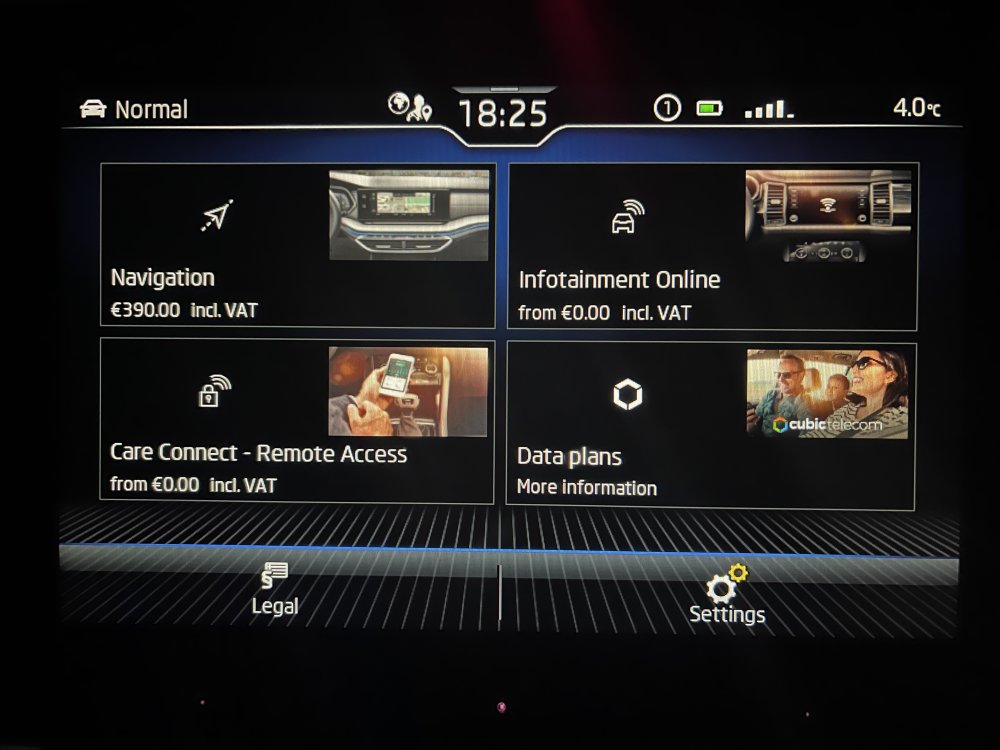
Well this is annoying !! Went to try and connect headunit to Wifi Hotspot to update software. Went pressing buttons, ended up in the Shop Looks like i’m sticking with Gmaps on Carplay
-
Very helpful, thank you. so in this case with the message Sat Nat unavailable, is this a glitch during a software update and requires a software update while connected to wifi or VCDS
-
Hi there, Have a 22 plate Sportline Sat Nav screen says function not available, not the end of the world as i use G Maps anyway on carplay but I also dont have any SD slots. My questions are, is this a case of the option not ticked or that its a glitch during a software update and maps arw stored internally. Thanks in advance for any assistance. Tom Also a side question while i have folks attention, anyone have colour LED door puddle lights, if so any good and where did you purchase?
-
I found the source of the leak, the rear near side passenger door is letting water in, but not on the cill, it’s on the wheel arch along the plastic trim where between the carpet and the seat bolster. Am I looking at a new door seal or should I be checking for other issues?
-
Thanks, very familiar with that smell of air on not being used for a prolonged period. This is more wet dog. Carpets appear dry Door villa dry.
-
Have the car about 5 months now (2020) Bought during a long dry spell from a garage. Now that the weather has turned for a while I’m getting a wet dog smell in the car. what (if any) are the common leak areas in a superb I need to check for. if if to pull the carpets up, so be it, I may as well lay some sound deadening while I’m at it. The car does get some condensation inside and so a leak was my first thought. Door runners would be my first suspicion but anything very common?
-
thank you for that Did the oil service last night, it would appear I am on variable so going by your image. Mine is: 30k km inspection or 365 days 15k km oil or 365 days 15k km is perfect for me as I flush and oil service about every 10k miles
-
Xman, You were correct with your post very early on. You even had it in bold about keeping the trip button down . what I was doing wrong was unpressing and pressing again to move from service oil reset to inspection reset. thank you i look forward to searching for the thread in 30000km 😂
-
UK import DSRB 150 Tdi 1st service 21000 Miles 4th May 21 2nd service 42000 Miles 16th Aug 22 48k miles on the clock now looking for Inspection. With the Inspection message on since mid August it would align with a yearly?
-
Good point, not sure, can i check without VCDS ? it says service in 3days under car settings, with no mileage mentioned. will give it a go worth a shot
-
Tried keeping it pressed and 2 observations, firstly, keeping the trip button held only lets me as far as the “Oil reset” option, I have to unpress and then press again to toggle to the next option “Service Interval reset”. Secondly, the inspection due message still takes over and then it reverts back to the main display page
-
I thought I tried that and while still holding it, it reverted back to main display after message went away. However you have me questioning myself so I’ll try that shortly Thanks
-
Limited to short video, but once the inspection due message comes up, I can’t do anything more as it goes back to the main dash display
-
FullSizeRender.MOV
-
yes, that’s the method I’m using. when I toggle over to “Service interval reset” the service reminder interrupts this, stays on the screen for 5seconds or so and the. The screen reverts back to the main display regardless of me having the trip button pressed or not. I try to get to it as fast as possible and have it done before the service message comes up but can never get it done in time.