Obsolete01
Members
-
Joined
-
Last visited
Everything posted by Obsolete01
-
Anyone know if it’s possible to do any coding on a 2026 Octavia RS and also is it possible to do some coding to always have the exhaust valve open? When you put it in to S mode the exhaust note changes slightly and I know that on the Golf R it’s possible to code it so the valve is always open no matter what mode is selected
-
Has anyone change the exhaust on the RS 265? I wonder if it’s worth it or would it sound pure crap without the back boxes? I don’t know weather to instead put in an induction kit
-
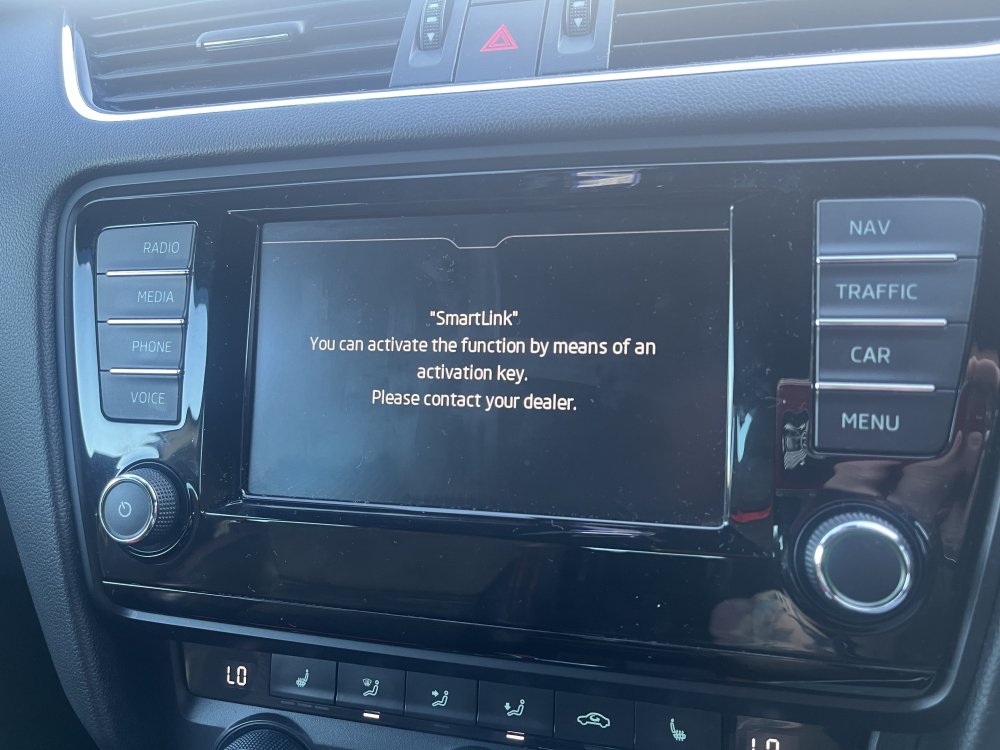
Dealer is looking for €350 to activate smart link on my mk3 vrs. Any other way of turning this on or any alternatives to enable Car Play?
-
@PetrolDave I don’t see any Apple play or CarPlay just this? So I guess I need to get it activated first?
-
Ok i'll have a look again, I did see Smartlink but then it said something about contacting the dealer to activate
-
im probably being stupid but where is carplay on this radio? or what button do i press to get into it @PetrolDave
-
This type of view on the screen? Or it is possible to get that type of view?

-
TMBKK7NE3G0119171 @pab567
-
Hi all, Looking for some suggestions on the below please: What Headunit could i upgrade to thats ideally plug and play with no coding required (but I do own a vcds so if i have to code something I can with instructions) I see a lot of chat online about H16 bs H11 and how some bulbs would need to be coded out to show them as not blown etc. So what ones do people recommend Joe Power (TDR) best in Ireland for getting an engine and dsg remap Thanks