




petersu
Members
-
Joined
-
Last visited
-
As far as we know this is hardware related.
-
Exactly! No more issues like that.
-
You need to make sure the infotainment system is on when you disconnect the soundbar because the on/off button will not work anymore. So far there was no need for me to do a hard reset by pressing and holding the on/off button.
-
May I ask how much you paid for the screen and where you got it from?
-
Well, I had another go at disconnecting the flat cable as suggested earlier in this post. I had both, the black and blue plugs connected and the radio was on (not sure if the ignition was also on). I then disconnected the flat cable shown in the picture of the earlier post and this time the screen stayed on. So, when I lock the car, the screen goes off. When I unlock the car and turn the ignition on, the screen also comes on. The On/Off button underneath the screen is now inactive and so is the volume slider. The volume can still be controlled from the steering wheel. Since I never really used these (now inactive) controls, I won't miss them. The car is now sitting in full sun on the drive and at this stage I'm quite confident that this is now finally the end of endless infotainment reboots and full volume radio when the car is locked. Many thanks @omeromeryigit for your suggestions!
-
...and Skoda just don't want to know or admit ever having seen it before. "Book it in for diagnostics" - despite me saying that nothing will show up in it. Out of warranty that's a costly exercise and when they eventually agree to replace the screen then that's over £1000 as far as I know.
-
To work around the issue that the infotainment system turns on and the volume goes up by itself when it's hot, it has been suggested in another post (https://www.briskoda.net/forums/topic/523716-infotainment-system-switches-itself-on/) to disconnect that module from the rest of the infotainment. However, when I try that, the screen goes blank - but remains active to touching (I can hear the touch sound). The user who suggested the workaround, kindly offered to send a video (when he has time) but I wondered if anyone else might have tried this? Also, is this issue restricted to the Octavia MK4? I saw pictures of the Enyaq and the infotainment system in that car looks the same...
-
Sorry, I don't understand what you mean. I had the blue and black plugs connected to the infotainment system. The screen was on and the radio playing. As soon as I disconnect the marked flat connector, the screen goes black.
-
Thanks, but that's just the same connector. I see you got the picture from mototeam.com.ua. Could you please send the direct link or links? Maybe I can find some additional info. Many thanks for your help so far.
-
I have the ignition on and the infotainment system is also on. As soon as I disconnect the connector (marked with an arrow inside the circle), the screen goes blank. Did I miss a step?
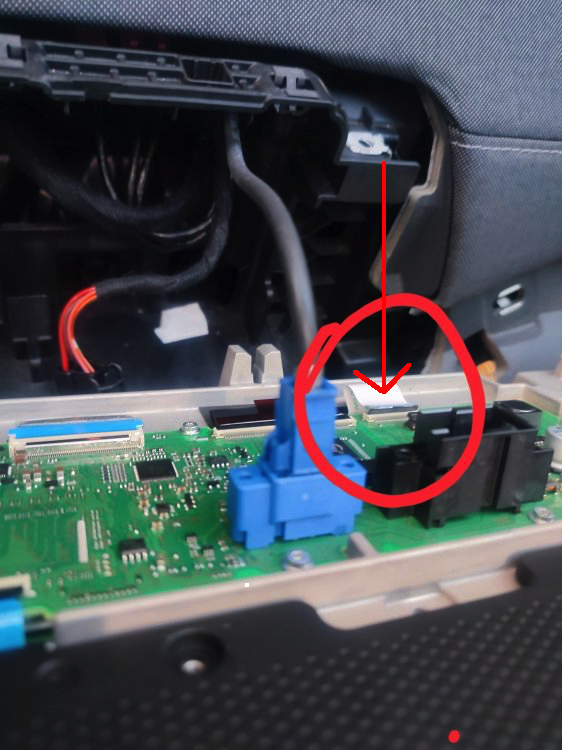
-
Nearly there now. Just the screws around the plugs are really tight. Need to get the right screwdriver. You said to make sure multimedia is open when unplugging the on/off button. So, do I need to leave the metal cover off, like in your picture? There is no way to have the cover on, multimedia open and still be able to access the on/off connector.
-
Thanks. I got the front panel off but I can't get the panel behind the screen off. Is there a trick?
-
Yes, but how do you get to it? I can't find out how to open it.
-
Since the issue occurs now day and night due to our heatwave in the UK, I'm very tempted to disconnect the on/off-volume slider as suggested in a previous post. However, I can't seem to find instructions for removing the screen. Anyone got any links? Cheers, Peter
-
That's great to hear. So, you can still use the system as normal, apart from turning it on at the screen and controlling the volume? All other buttons still work?


