MartyK
Finding my way
-
Joined
-
Last visited
-
And today the turbo failed on the car. I'm not having much luck. Is there any chance the two are connected? Cabin heater registering temperature too high. Is the turbo on a 2.0 Yeti water or oil cooled?
-
Actually, that might have helped a lot. I will take the cover off this weekend and see. Thanks for that!
-
Well, it also has an effect on the heating system too, as it thinks the car is now hot enough, and turns the heating off. So I'm currently driving around in jumper, jacket, gloves, thermals...
-
Thanks for the diagram. It's good to know the rough location, but that diagram isn't exactly the most descriptive is it of where it's located. Also, being a left hand drive car picture, it's giving me a mental breakdown trying to flip everything in my head to work out where it should be. So I'm guessing behind the middle radio console part of the dashboard. Lords knows how I'll get to that. Guess I'll no longer be using my air conditioning then!
-
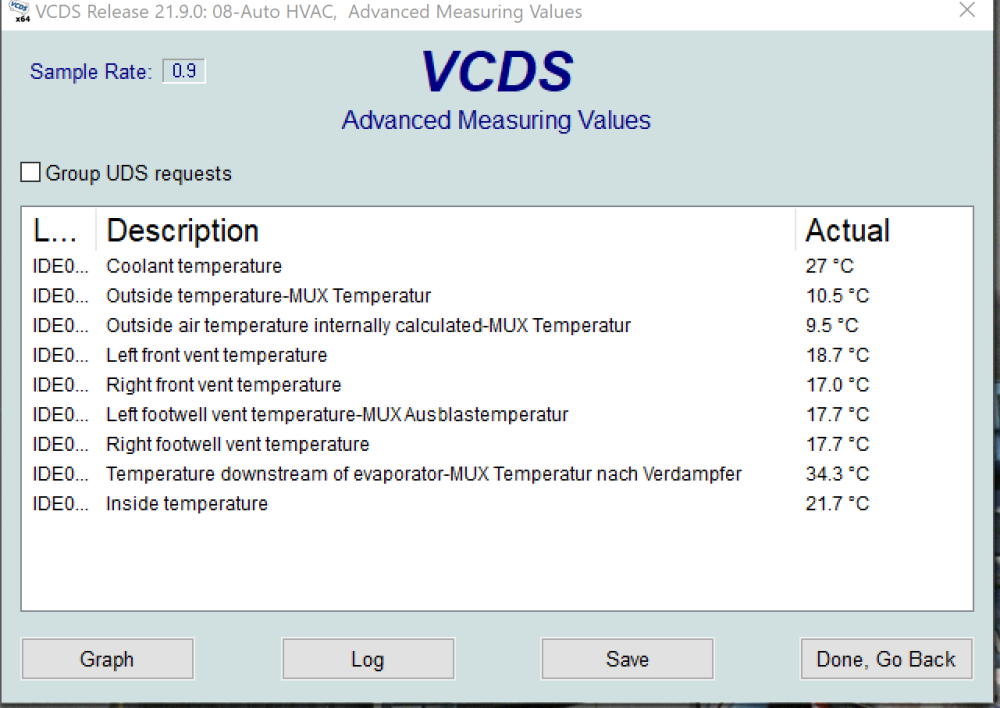
I would love some help. My 2016 Skoda Yeti L&K has an air con issue. I start the journey, and the air con comes on nice and strong, but slowly over the course of my journey, less and less cold air comes out, and it feels like the air con hole is freezing up/over. I park my car and a short time later, there'll be a HUGE puddle of melted water under my car after the air con has thawed out. I hooked up my VCDS after my car had sat overnight, and checked my temperature sensors. All were reading reasonable temperatures except for "Temperature downstream of evaporator-MUX Temperature each Verdamfer". This was reading 34.3c/93f which is far hotter than it should be. So I'm guessing this sensor has broken and that's why the air conditioner is running constantly as it thinks it's always hot. Question is, where in my 2016 Yeti would I find the "Temperature downstream of evaporator" sensor? I'm guessing under the bonnet somewhere? Picture attached.