martynd7
Finding my way
-
Joined
-
Last visited
-
Hi there I recently bought a Karoq 2 litre 4x4 and have put fuel in it once with no issues but now the fuel flap won't open and I am running out of fuel, has anyone got any ideas please. I phoned the dealer and they just said break the flap and book it in to be fixed!!
-
Thanks for your help, do you have a picture of the PowerPic chip please so that I don't touch the wrong one, thanks again.
-
Hi all, I have a 2012 Superb estate with a Columbus head unit recently it has started to make a noise like a pop through the speakers then it shuts down and reboots, it does this all the time so it is not really usable. I have removed the unit because I read on one of the forums that it might be a bad solder joint on one of the chips, I wondered if anyone had experienced this and is the cure? Also on this point, I don't appear to have a bit that fits the screws on the case, could someone please tell me what they are, thanks.
-
Hi all I am going to look at a Yeti tomorrow and I wondered if there is anything I should look out for. It is a 2014 Greenline ll 2l that has done 80000 miles,thanks in advance.
-
-
Thanks, any idea what this colour might be called?
-
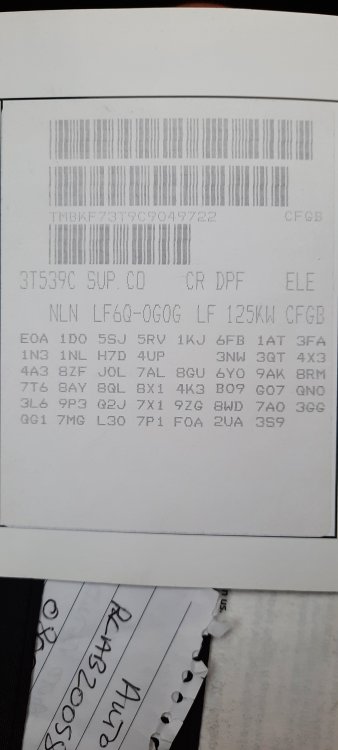
Hope this is what you need, thanks.
-
Thanks for that I will send asap.
-
Hi there, I have just bought a Superb Estate 2012 and I am trying to find the paint code so that I can touch up some of the marks on the bodywork. I have checked the sticker in the boot but it is pretty illegible and I have tried to work out the sticker in the handbook but still not really any success. The car is a metallic green and I haven't seen many in this colour so I am hoping someone on the forum might know, thanks in advance. Also can anyone recommend the best paint touch up pen to buy, both colour match and application, thanks again.