




villi123
New here
-
Joined
-
Last visited
-
Thanks Tell. Some further investigation this time with the links MartiniB posted. I get the same issue, maps load (22/23 EU AS 1810) and can be seen but routing seems intermittent. I live just outside of Maidstone, so nowhere exotic and i would expect it to be digitised in great detail! Interestingly, when i drive away from my local area say a few miles (perhaps onto another map tile) the routing seems to work fine, puzzling......
-
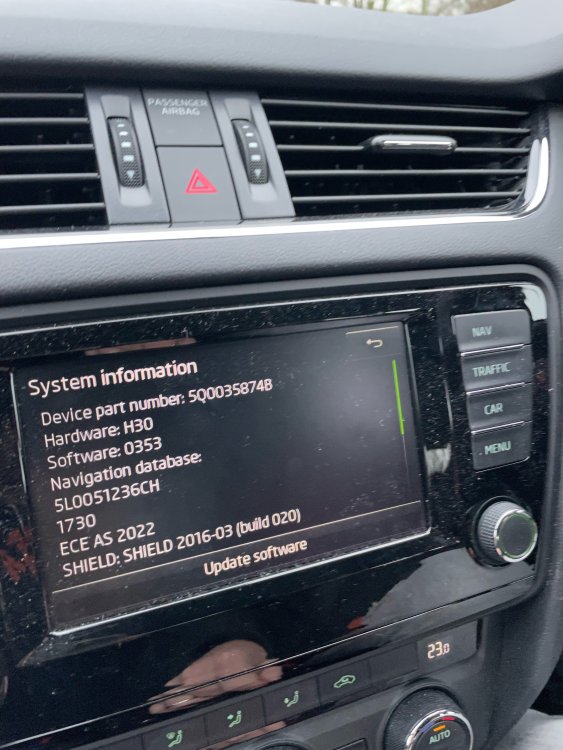
Morning Pab, any updates available for this , and also what the changes are to see if its worth the hassle? Thanks
-
Thanks for the guidance, Tell. I have gone through everything again and it now seems to work-ish. But every now and then it still get the "error accessing navigation data," message and it won't calculate a route. If i go back to my original app data the issue goes away so i have ruled out it being a dodgy or failing SD card. I will leave it a while and see how it develops.
-
Well I've not had much luck... Tried using the official skoda portal with my vin number, downloaded and installed the filed onto my sd card, plugged it in to the car and can see the new map and version number in the info, but it won't calculate any routes further than a few miles away. I get an error "error accessing navigation data". have gone back to the previous version of maps and they still work fine any ideas anyone, might it be that i need a firmware upgrade? Any help much appreciated.
