



gee57
Finding my way
-
Joined
-
Last visited
-
Been there, done that, polished the lens, quality Philips bulbs , the headlights are 14 years old , the aluminum coating on the projector lenses degrades. Period.
-
Well my superb is a 2010 model with 235000 miles, and I think they're the originals, how did you clean the projector lenses without removing the front cover ?
-
https://youtu.be/6cYQvmuK9FM?si=ItmHjmH3dY_68Ohy
-
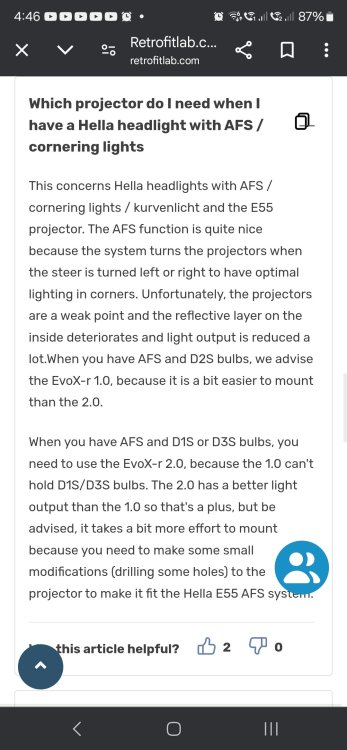
From retrofitlab q&a.
-
I " was" going to fit new genuine hella headlights, but all the ones advertised on Ebay are for European, RIGHT HAND DRIVE cars, but they neglect to tell you that in the listing, stating that they " are" suitable for UK roads, and then adding that they " may fail the mot" !!!! You can buy from skoda, but I think UK headlights are roughly £700-£900 EACH, that's why I've gone down the projector route, now if I can find someone to fit these for me 🤔
-
New PROJECTORS and bulbs, old crusty projector out, NEW retrofitlab projector in with a better more modern lens, needs the front lens to come off to fit it.
-
Thanks, now I need someone to do it ?
-
Hi all, is it true that if you fit new brand new bi xenons to a 2010 skoda superb elegance that they have to be coded to the car with vcds ?
-
Don't think this is the same as my car. I have the 170 bhp CBBB engine.
-
thank you
-
HOPE someone can help me , i need to know if there are 1 or 2 thermostats on my superb elegance with the CBBB engine code 2010 model, it`s a MANUAL G/BOX, i`ve had the "lower" thermostat changed a few months ago, to try and increase the heating in winter, but i think there`s another "old type" thermostat, not the 1 in a plastic housing that can also be replaced, however i have no idea where this thermostat is located, can ANYBODY help me please 😁

Important Information
Welcome to BRISKODA. Please note the following important links Terms of Use. We have a comprehensive Privacy Policy. We have placed cookies on your device to help make this website better. You can adjust your cookie settings, otherwise we'll assume you're okay to continue.