LabrosZ
New here
-
Joined
-
Last visited
-
Thank you for your answer, I will definitely change the filter too because I doubt that it has been changed for the last 80k km to say the least... Thank you for the information, I am thinking of getting some ramps and changing both the oil and filter myself using a kit I found for the gen 4 haldex. Honestly, I still haven't found one mechanic in Greece with great experience on this vehicle. And every time I go to a dealership all they do is read the codes and change stuff by what the diagnostics tell them...
-
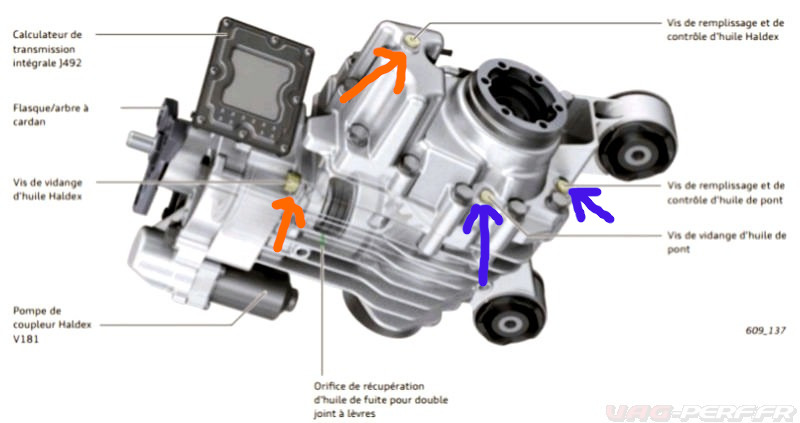
Hello, I have a 2009 Skoda Scout with the KMC rear diff. Today I went to the car repair shop and told them to change the Haldex and rear diff oil because I was unaware of when the haldex oil was changed last time or at what condition the rear diff oil was (the car has 156.000km). The mechanic assured me that the rear diff and haldex oil is the same and that it filled from the same set of screws. He opened up the drain and fill screws for the rear diff and filled it with Genuine Rear Differential Oil - G 060 517 A2 . However the screws that he drained and filled the oil are the ones marked with blue arrows in the attached image. And there are two more screws(marked with orange arrows) that I am reading online that they are used for the Haldex oil. He said that those screws are probably for different models when you dont have access to the other screws. if I understand the information I find on this forum and online correctly, the mechanic just changed the rear diff oil and NOT the Haldex oil? Was the mechanic wrong or am I missing something? Thank you in advance.