Paulric4
New here
-
Joined
-
Last visited
-
-
-
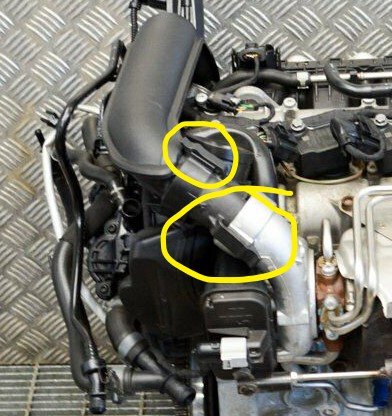
Just had a quick look under the bonnet, the pipes / hoses do not feel loose assuming i'm looking in the correct area with the light from the phone, It makes sense a pipe being loose to the turbo with the symptoms I have. Will have another look first thing tomorrow, but seeing as I paid all that money, I shall be popping around to Skoda and getting them to look at it.
-
Unfortunately, I don't look under the bonnet other than to check fluids etc so I wouldn't know if that was the case but it does sound about right, give me a classic mini or MK4 Cortina, I wouldn't have a problem stripping parts down, things have got too electronically complicated for me.
-
Hi, after a bit of information or advice before I go back to the Dealer as it is now too late in the day now. Had the cambelt replaced as it is 5 years old along with oil and filter, I only live around the corner from the dealer and it was slow traffic so didn't notice the following. Drove the car and it felt sluggish when i put foot down and then slowly picked up speed, I can usually feel a definite pick up of speed, I now hear what sounds like an intake of air as the engine picks up speeds, I've never heard or noticed this before. Just wondering if anyone has any possible reasons. Octavia SE L Tsi, 2017, Thanks in advance.