chetski
New here
-
Joined
-
Last visited
-
@Framen I have a similar issue on a 2009 Fabia (although my cluster looks different). 99% sure its damp/cold related as it only happens in winter and car runs fine. Also the cluster gives various beeps and lights up like a Christmas tree on the 1st start/drive of the day but later in the afternoon is fine. Never have this issue in summer. Do you have instructions or video link on how to remove the cluster and check the connections? Also, are there places to check/clean for water getting in or behind the cluster. I don't have wet carpets or anything but sometimes it can feel musky/damp in the cabin (and my air con needs re-gassing which isn't helping I guess).
-
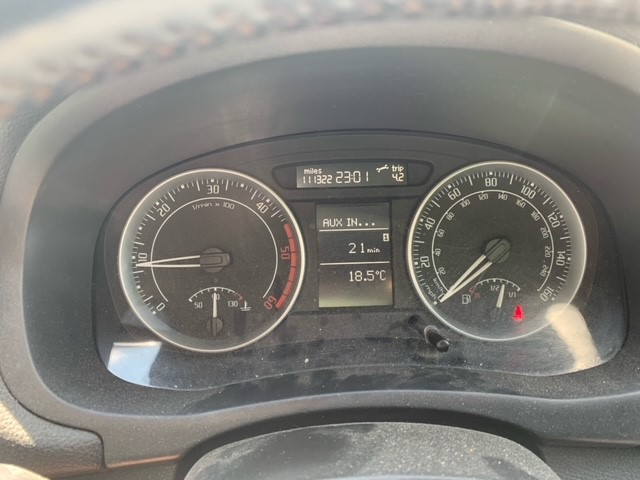
Thanks @UrbanPanzer the first link looks like it has the same instrument cluster as mine but can't make out the steps he's using. Also, not sure what he's actually doing as he doesn't clear anything and his clock goes from 12:09 to 12:10 (could be just coincidence). 2nd video doesn't work for me at all and its a different dashboard. I'm assuming the Service Now message and the spanner icon are actually the same thing? I'm fairly sure when I did it in the past I had to hold it down for a number of seconds??
-
Hi all, I'm trying to reset the service indicator or my Fabia (2009 1.4tdi). I've seen various youtube videos and followed them all but none work for me. The usual videos/instructions are: 1. ignition off 2. hold reset button down 3. switch ignition on 4. let go of reset button 5. turn/twist reset button to right. However when I do this and turn to the right its just updates the clock (increases the minutes) :( All the videos I have seen have a slightly different instrument layout than mine so wondering if my Fabia has different steps. Annoyingly I have done it in the past but just can't remember how. I've attached a picture of my instrument layout (its the spanner icon I'm trying to remove) - anyone any ideas? Thanks in advance, Chet