




Dinna89
Finding my way
-
Joined
-
Last visited
-
Nope I suspect that the MFD nav only works for native GPS on the head unit, and I only use android auto.
-
Brilliant, found it here now to solve the head unit issue...
-
I've got a VCDS and I'm wanting to change a few things on my Fabia MkII -Get navigation from new head unit to MFD -one click unlock all doors No idea how to go about the first one, but noting I've installed an Alpine iLX-702D head unit connected using the APF-X300vw interface which is meant to allow navigation and song info to come through to the MFD, as per their website https://www.alpine-electronics.se/p/Products/SingleView/apf-x300vw. Can anyone point me to the setting I need to change to get this working? For the one click unlock, I see other threads showing how to do it - see below. the problem I'm having is that I can't access the '46 - Central Convenience' setting on VCDS, when I click into it it says there's 'no response from controller!' as per the screenshot Am I missing a step here? Why can't I play with these settings? Auto-scan results below if they're of any use
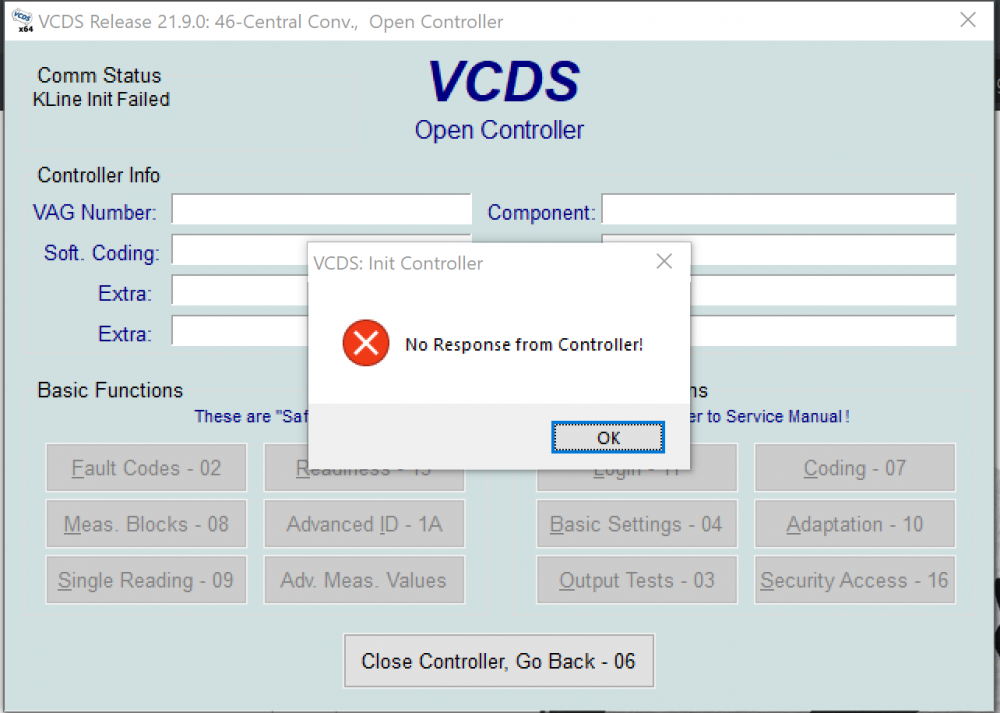
-
So, the APF-x300vw is great, far better than the Autoleads CP2-UNI controller I previously had installed. I believe I will need to code the VCDS to get the navigation coming through to the MFD, but otherwise all my controls are working as they should. The Autoleads controller took ages for the head unit to turn on (20 seconds or so after the ignition), with the APF-x300vw it turns on when I unlock the car
-
I don't know, the setup manual certainly didn't mention anything like that I've taken a gamble and bought the APF-x300vw, I'll update this thread when it arrives
-
I've got a Alpine ILX-702D head unit, I want to buy the Alpine APF-X300VW to allow the head unit to interface with the MFD/Steering wheel controls The APF-X300VW does not retail in Australia, so i have to buy it from UK or Europe. Is there any reason why my Aus model 2012 Fabia wagon would have any compatibility issues, or should this work fine? I'd previously hooked it up with a CP2-UNI however this didn't work with my volume roller, and I accidentally shorted the unit out when I was trying to get it working properly :( I've attached some images of my steering wheel controls, and the OEM head unit
.thumb.jpg.2ea330647f2ecffcc3a5288811f692d4.jpg)
.thumb.jpg.5236e1452621aa2453980eef879b4731.jpg)
.thumb.jpg.189d71242d096a5c17bfeedafb221eda.jpg)

.jpg.3272b88ac39959a375cf9065abb9ac00.jpg)
.jpg.1aacf57335a6efc227f5382d60bc533d.jpg)
.jpg.c9925b197bc466cfe9ed4ee59cc56b07.jpg)