




Spyne
Finding my way
-
Joined
-
Last visited
-
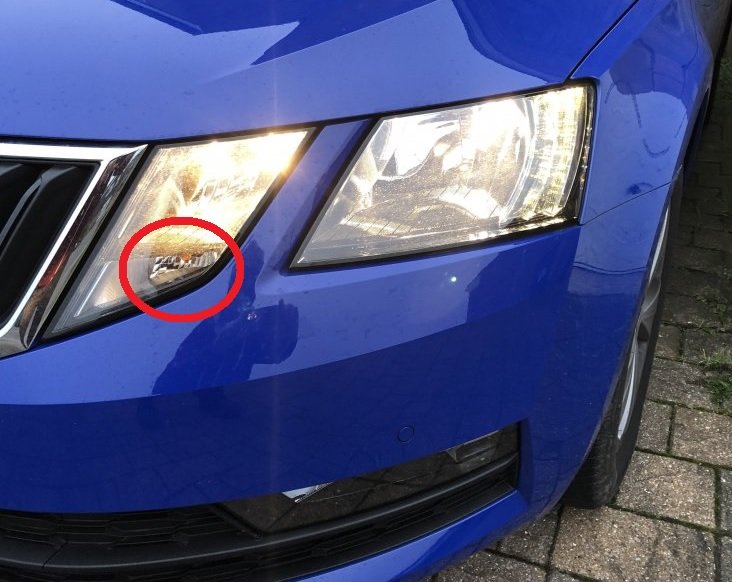
No reply to my question regarding the process for facelift models? Indicator bulb is in a different position compared to the mk3, and I can't see any obvious way to get at it.
-
Bit of bump here, but is the process the same for the MK3 facelift, ie. near impossible? I note that the indicator bulb is in a different position on mine compared to the pictures from OP - mine appears to be in its own housing underneath the headlight, in the inner section of the headlight. To steal and modify another briskoda user's photo;
-
Wouldn't that depend on the depth of your speakers - also, if the adapters are 36mm deep, what is the total possible speaker depth? Thanks for this link. Translation is a bit sketchy, but gives much the same info as other 'build' threads here and on other forums.
-
no one?
-
Good morning from Australia, experts. Hoping someone will be able to assist with providing info on the standard mounting depth for front speakers in a 2019 Octavia, and then, what the maximum mounting depth achievable with a custom speaker ring/baffle is, without fouling on either the glass or factory door grille. I've got all the pieces lined up for a stereo upgrade except the speakers. The mounting depth limits will determine just which speakers are suitable (ie. I don't want to buy something that has a depth of 90+mm if they simply aren't going to fit). Cheers.