Funkstain
Finding my way
-
Joined
-
Last visited
Everything posted by Funkstain
-
Apologies if you've already tried this, but it is more complicated than in the MkIII: here are the relevant instructions from the online manual which sucks: Saving the position of wing mirror on the passenger's side for reversing Turn on the ignition. Select the Car settings / Exterior menu in the Infotainment system. Select the screen with the Mirrors item by swiping with your finger. Select the Mirrors item and activate the folding wing mirror function. Switch the wing mirror control to R position (assume L for RHD car) Engage reverse gear. Set the mirror to the desired position. (this is the key bit you have to select the position manually) Disengage reverse gear. The set mirror position is stored in memory.
-
Hi Stonekeeper, just wanted to say thanks again for your suggestion: that is exactly what the dealer had done when ordering from factory; they’d selected the tow bar with trailer assist which then forces parking pack to be added. They were insistent if I wanted tow bar I had to have parking pack and I would’ve given in. Thank you for the reply and the instinct
-
Thanks for that, no we didn’t but I wonder if the dealer has added it by mistake when ordering - I’ll follow that up thanks!
-
Hello, We're about to sell our Superb Mk3 and order the new Mk4 estate in PHEV form. Everything going fine, when dealer calls and tells me that if we want the tow bar, we have to order the Parking pack as well. This isn't shown by the Skoda configurator, CarWow, or even the dealer's own order mgmt system. We actually had the parking pack on the Mk3 and it was pretty useless for us: area view sucks, and the auto parking was just that bit too fiddly to be useful and become trusted. More importantly it's a £750odd option which we do not want to pay for, but we need the tow bar. Anyone else had this experience? Is it a factory thing?? (he mentioned that others had had problems with ACC needing the Winter pack, ie: the upgraded steering wheel) Thanks!
-
Hey Nick, with users set up on your car - does it work such that one key is recognised as one user (you), and another key is recognised as another user (your wife), and settings are adjusted according to which key unlocked the car?
-
Quickest way I've found to sort it, is go to iPhone control centre. You'll notice wifi is turned off (it's not, of course, but): turn it on. You'll get a warning: turning on wifi will disconnect CarPlay. say OK. Infotainment will say: device disconnected. Turn off wifi again and wait for it to reconnect, usually quite quick. You've got a better than even chance it'll work this time; if not...sorry, it's rinse and repeat.
-
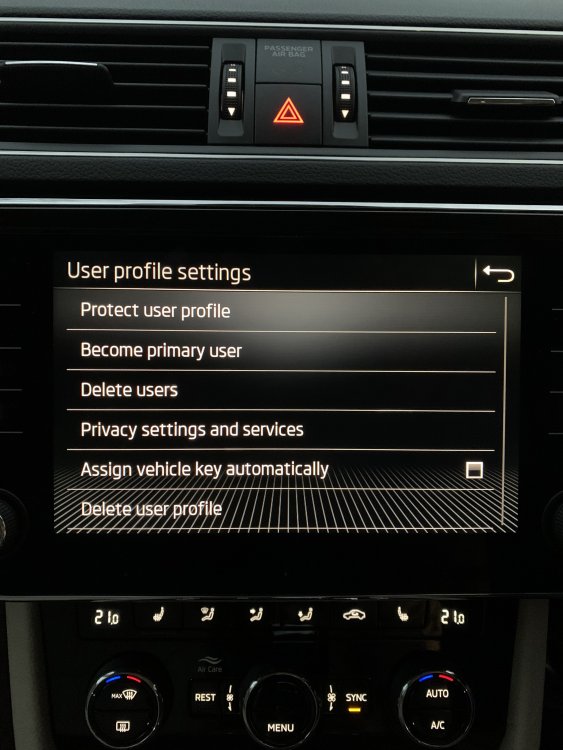
Just in case this is ever helpful to someone else searching t'internet for this weird issue, a progress report... So manual key assignment simply isn't a thing with MY21 Superbs, it seems. I've spoken / online chatted to 4 different Skoda reps and have literally had 4 different answers about this. What I've been able to achieve is, by selecting "automatically" in the menu above, assign the main key to one of the users. We've had loads of connectivity issues with the esim, which ruins the user experience: if you climb in and want to change to your settings, you try and switch user after ignition (already a bit cramped...), and it just sits there trying to "synchronise" and then says "feature not available", meaning you're stuck with all the settings of the other user. Clearly you don't want to ruin their setup, so this is, well, crap. Instead we deactivated the esim and have basically disconnected the car as much as possible from the internet - this works at least to change users more effectively. Haven't been able to assign any other keys other than the master key, god knows what I'm doing wrong. Another issue with connectivity has been reported in a different thread: when you connect via CarPlay or android auto, it can sometimes show that your phone is connected to wifi (which it is: the wireless connection for CarPlay/AA), but of course that's a closed local connection so there's no internet. Forget routing, satnav, anything else to do with internet via your phone...only solution is to force disconnect and try again (50/50...) or wait 5 mins for the phone to say "hang on looks like this connection isn't internet connected! want to go cellular?" and say "obviously you ****"). TL;DR: Skoda, VAG and the rest of them still, after all this time, have no idea how to engineer software that is user friendly and useful and reliable. first world problems I know but it sort of ruins the experience when the car says "hello (not you) user!", forces you to squeeze in, then doesn't let you alter the settings to yours because "computer says no", and then even CarPlay doesn't work. Other than that, the car is truly lovely! A pleasure to drive, and the travel assist function is uber relaxing.
-
I've experienced this problem once or twice so far in my MY21. Didn't realise it had happened at first, then I took a wrong turn and the Waze re-routing just didn't kick in. I picked up the phone and unlocked it, it popped up a message saying "cellular data was turned off". Turned it back on, and everything worked again. Weird. Quick note: Wireless CarPlay works via bluetooth and wifi. Bluetooth is used to set up and authenticate the wifi connection with your phone, then bluetooth disconnects. If you look at your phone's control centre, it'll show wifi as being disabled whilst connected to wireless carplay (and when you go into settings, you'll instead see that you have a wifi connection with your car's wifi hotspot...). If, when you're connected, your infotainment shows the phone's connection as being wifi instead of cellular bars, you've probably got an issue and you'll have to disconnect and try again.
-
Wow. Not sure how different the personalisation / users stuff is on Kodiaqs but you're certainly having a different experience from ours! First, thanks for replying, useful stuff. Second, to answer your question: the User-based personalisation we've set up on the Superb covers, at least (from what I've played with so far): - Seat position - Wing mirror adjustment - Media playback (last source playing (including no source) starts again when user logs in) - Climate control - Various minor things (settings like wing mirror adjustment synch, light brightness etc) It does NOT seem to remember drive mode setting. Could be a sportline / L&K feature maybe. Third, to continue shouting into the void with my experience...Have online-chatted with two Skoda reps now. Very friendly and patient but clearly just looking at manuals like I am. First guys said "just deselect the Assign vehicle key automatically" option, which, yeah tried that mate. Second guy got really into it, but eventually gave up with "sorry your car actually doesn't come with this user --> key link, that's Kodiaqs and Karoqs only". I'd like to believe him (to stop me spending my actual finite life on this first world problem), but what does that setting do? (I attach a pic for those interested (?)). Also previous model years right up to MY21 DO include user -> key linking with memory functions - would this really have been taken away from the SE L model with the updated MIB3? The manual is very confusing. On the "key" section it talks about memory function but that this doesn't apply to cars with personalisation feature which ours has. So you go to "Users" section and it describes menu items which don't appear, sigh. Anyway bit stuck now. Thinking about taking it to a dealer so they can play with it for a bit, maybe they've figured it out.
-
Just can't solve this. Any ideas who I could contact within Skoda? Have tried a few numbers but it's call centre level stuff, they seem to know less than I do :(
-
Thanks DB - yeah, I've seen in other threads on this topic, and online research, that's how it used to work. I don't seem to have that option anywhere. There's a "users" option on the main infotainment menu, with no sub menu or option to manually assign a key that I can find; in the "car" menu I can't find anything to do with personalisation or keys at all!
-
Hello, long time lurker first time poster (thanks to all who helped, unwittingly, in my decision to buy a Superb!). Last week I picked up a new Superb SE L. I'm loving the car, it's a classy ride and exactly what I hoped for. One of the features we really needed in our new car was personalisation, preferably linked to specific keys: my wife using her key would get her seat position, mirrors, AC etc set her way, and mine with my key. At best though, it seems very flaky, or I'm getting something wrong - often it would "welcome" the wrong user to the car despite the correct key being used. The manual doesn't really help - it mentions turning off "automatic key assignment" in the relevant sub-menu, which I've done, and assigning keys manually - but I can't see how to do this anywhere. It seems with MB3 there have been changes in the menus, maybe? and not properly reflected in the manual? It's very first world problem I know, but would be super grateful if anyone has any ideas!