Grah
New here
-
Joined
-
Last visited
-
Hello, My girlfriend was driving the other day and the TCS light came up on the dash with check engine, when I scanned for codes only P0341 came up, it had a new timing chain a maximum of 10k miles ago. I took it for a drive and a P0068 was there but cleared and never came back but the TCS light had come on again along with check engine for the 341. I've checked the connections on the sensor they look ok and no cable damage and seal looks good on it too. It also came up with the battery symbol and went in to limp mode but cleared instantly after turning the engine off and on and hasn't reappeared since. If I rev it in idle to 3k+ and come off the accelerator it very nearly stalls. It sometimes takes a couple of extra seconds to start too but when driving it it feels like it's running smoothly. Anyone had anything similar to this? Thanks
-
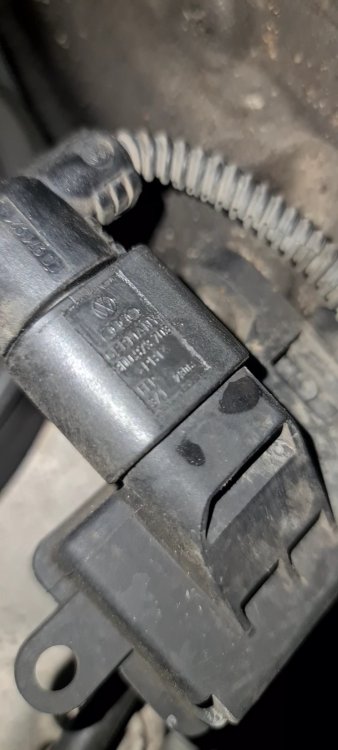
Hello, My girlfriend's Fabia MK2 had come up with a P0341 fault which I have cleared and it has stayed off for now, but want to be ready incase the problem reoccurs. I am looking to order the Camshaft sensor but I cannot find a replacement in the same shape as the one already installed. I am not great with cars but I am on furlough so trying to save money by repairing it myself if it reoccurs. I am assuming I'm looking at the correct sensor and the only part number I could see was 3D0973703 which is the number for the plug fitting not the sensor. The car is a MK2 Fabia Reaction 1.2 petrol 12v 63 plate. The picture is what the sensor looks there wasn't much space to take one! Thank you
-
Long time lurker finally made an account, driving a Skoda Fabia for the past 8 years