Colliedogs
Finding my way
-
Joined
-
Last visited
Everything posted by Colliedogs
-
Whilst waiting for the inter island ferry between Yell and Unst this evening, I entered my home destination into the satnav to see what would happen: to my amazement, the starting point was determined to be 77 miles away from the Shetland Islands west coast, in the Atlantic Ocean! Hmm 🤔
-
I hadn't but I have now just removed it and replaced it just to make sure that it hadn't come loose. It's still the same 😕
-
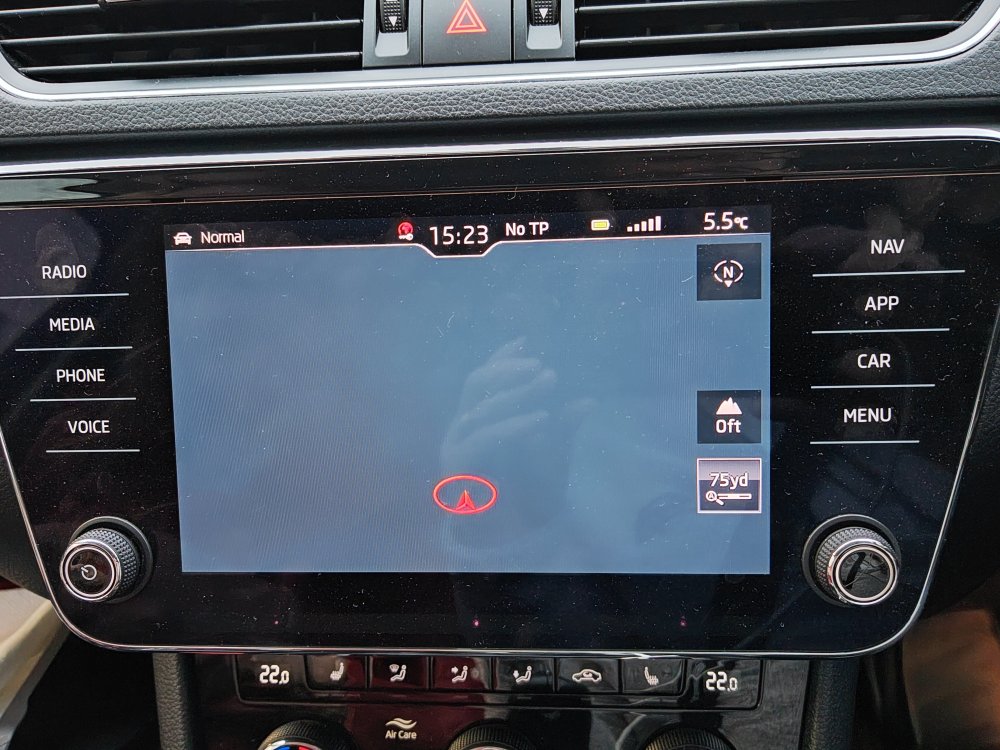
My Amunsden Nav Map has disappeared - please attached photo. There is also a symbol at the top of the infotainment panel which is a red World with a key under it. Any suggestions would be welcome please. Thanks in advance. Cheers HarryH
-
I changed the car battery on my Mk2 Superb last week but I'm left with several persistent warning lights: ABS, Tyre Pressure, Powered Steering and the headlight beam bend. The battery is identical spec to the original. My battery diagnostic tool isn't seeing any problem. Please help how to reset these alarms. I've driven several hundred miles since the replacement and the battery is fully charged. Many thanks, in anticipation.
-
Many thanks 👍
-
Hi guys. I've finally admitted defeat and now have had to ask you experts for advise please. My SatNav map is years out of date which caused chaos last week whilst driving through Wales! I've got a 2015 Superb Estate and a Huawei P30 Pro (wife has a new Honor Magic Pro, if it helps) Please advise how to update my maps etc. Many thanks Cheers HarryH
-
We leave our dog in the car for a short while whilst shopping in our supermarket. We always leave all 4 windows left open for 2 or 3 inches and has never been a problem with our previously owned Citroëns; however, our windows seem to automatically close after a few minutes which is not acceptable when the dog is in the car. How can I disable this function please? The user manual isn't particularly helpful. Many thanks