Griffington
New here
-
Joined
-
Last visited
-
Thanks Ken
-
Oops - sorry realised I posted this in the wrong section - admin please feel free to delete
-
Dear Citigo experts.. Noticed today that the rev counter on my 2014 Citigo SE has stopped working properly. Can see the needle moving slightly sometimes, but usually in wrong direction. Any ideas what might be causing this/how to fix it? The digital one in the nav unit works fine so I'm not personally that bothered, but as I'll be selling fairly soon it would be good to know if it's an easy or expensive fix. Thanks in advance for any advice or info PS I'm not at all handy with cars, but would be good to know what kind of cost I'm potentially going to incur at the garage
-
I only wanted to see if anyone knew if they'd fit or not In any case the wheels I was looking at appear to have sold now, so my quest continues Thanks for all the replies though
-
Thanks for the replies - yes I know it's not a standard size, but I was just wondering if they would cause any issues (e.g. rubbing) and didn't fancy going to the trouble of fitting spacers Also - the std alloys weren't exactly pushing my buttons Not to worry though - will see what I can find out
-
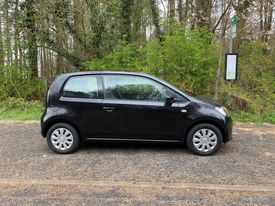
Hi all Just bought a 2014 Citigo and was thinking of swapping the steel wheels for alloys, seen a set for a decent price but not sure if they will fit ok Can anyone advise? Apologies if posted elsewhere but have tried searching with no luck Wheel size is 15 x 6J (ET45) Many thanks in advance for any help Here's a pic just for the hell of it