Ronal
Finding my way
-
Joined
-
Last visited
Everything posted by Ronal
-
Anyone one got it to work with batals instructions with Elm327.
-
I just got my device today, will try to see how it works. Can you provide me the link you mentioned above on guide/forum. im very new to this.
-
Have ordered my ELM327 adapter. Hopefully will get it in next few days. Any recommendations of the app for andriods which works the best to do this.? Thanks
-
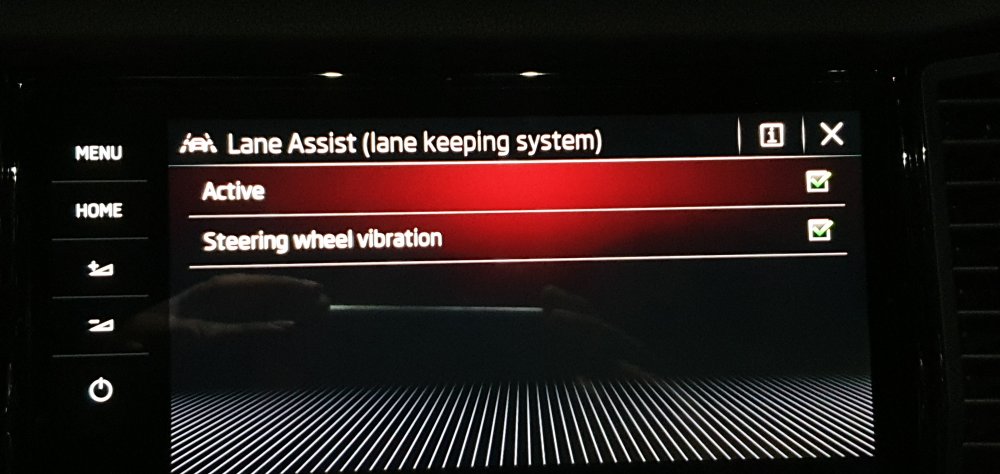
Thanks batal. That's good news. Ill look into the adapter. Sounds promising now. My lane assist came active, i just need the adaptive lane guidance to be active now.
-
I guess just have to wait it out. Read that Ross Tech is working on this issue ..hopefully there is something in the future 😀
-
Ahhh that sucks, if i was offered that option as a add-on i would have, but in my car there wasn't any options to add apart from ventilated leather seats. I actually confused my self with lane assist thinking that was it...silly!
-
So does that mean even with VCDS i wont be able to code in the adaptive lane guidance?
-
Hi @Billywizzo Thanks for the info. Yeah I'm suprised they would disabled that feature..where as most VW /Audi group is using it. I got so used to it on highway driving in my old tiguan..
-
Hi @langers2k Thank you. I'm still waiting on my VCDS. from Ross Tech. Once i have it ill do that. Ronal.
-
Hi to anyone that can help. I have a My21 Skoda Kodiaq RS. Just took delivery of it last week. I'm trying to have the feature "Adaptive Lane Guidance" activated. I think it should be appearing under Lane assist once its activated. Has anyone coded this feature or can help? Thanks.
-
Hi. I'm new to the forum and new to skoda. I'm trying to figure out if anyone has activated the feature "adaptive lane guidance" in my MY21 Skoda Kodiaq RS. Seeing some stuff on the net but not very useful. Some research says you need OBD11, but cant find any coding helps. Thanks.