superb21
New here
-
Joined
-
Last visited
Everything posted by superb21
-
I have the same issue with my 21 Superb. It doesn't always cause the GPS malfunction or hang the system, but really annoying when it does, as you can't even listen to the radio. I also find it happens more frequently driving in London than anywhere else (not exclusively, but noticeably - I drive in London maybe once a month or six weeks and it almost always happens there.
-
I can vouch for the fact that updating the Infotainment system does not fix the problem! My dealer did this last week and it made no difference at all.
-
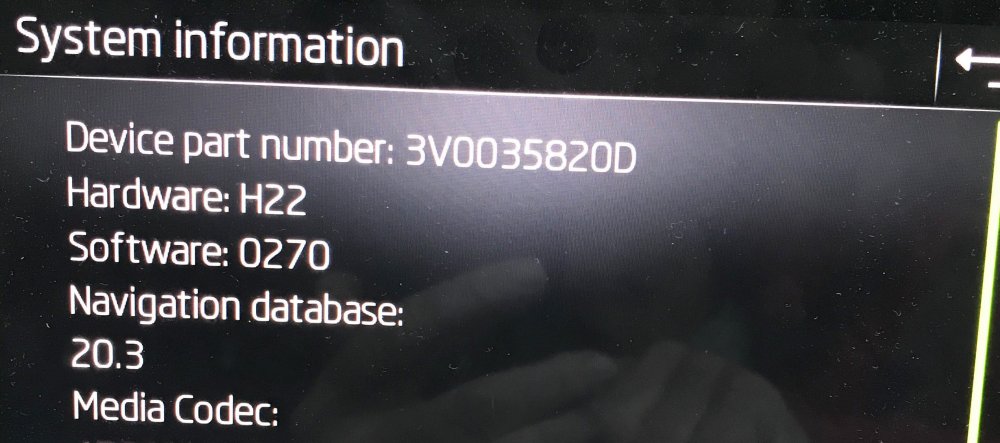
Here's the information I can find ... it's the standard Navigation system. The dealer told me they had updated software last week, which is about all I expected. This didn't fix the issue.
-
I have similar issues with Predictive Cruise Control - infrequently, but regularly, it appears to read a speed limit in mph as if it were in kph - typically it reports speed limit as 70 but changes the PCC set point to 44mph. This normally happens when it is setting speed from GPS position, not when reading road signs. Subsequently the speed limit changes, for whatever reason, it will perform a similar units conversion - 60->37mph, 50->28mph etc, which can cause a sudden slow down. I have also often seen it report a speed limit of 110 when it should report 70, which it then converts to 68mph set point. I just got the dealer to update the software, but obviously no fix for this yet. Is there a way of communicating directly with Skoda technical people?