Georgepap
New here
-
Joined
-
Last visited
-
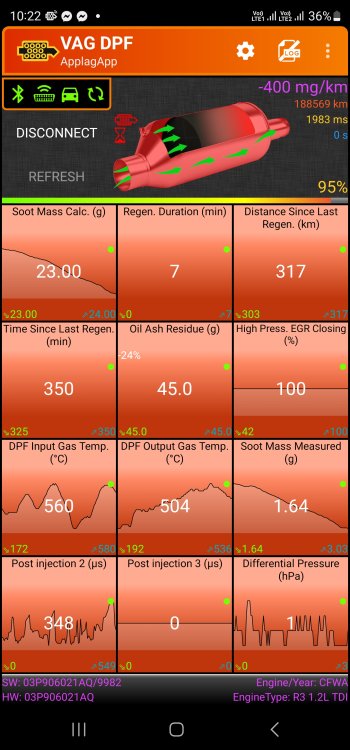
Hello to everyone. I was called recently by Skoda representative and I was informed about the airbag recall 69DU. They told me I should also have the software update 23CM. However, after the update my engine has changed its behaviour and the DPF does regenerations very often and for very longer time. Before the update every 300-350km lasting 30' appr. Now every 100-150km lasting appr an hour. This is something really frustrating. Let me ask you, this was the EA189 diesel engines NOx update (23R7 I think) or a different update? Sorry for the lack of knowledge, but I bought the car as used at 2019 and I suppose the EA189 campaign had already been done by the previous owner. Of course I went back to the representative but they did not find anything abnormal. Any help would be appreciated. Let me attach an image for my DPF as appears at my OBD app. As mentioned earlier (Mr Sec8200), the software number at the bottom has also been changed after the update. (9978 before, 9982 now) Thanks in advance
-
I am afraid no sir I did not have such a guarantee.
-
Thank you. Well to be honest i received the recall letter for the airbag and I was informed at the workshop that I should have the update, as well. The car was bought from me at 2019, so it had not been done earlier 🤔
-
Good evening to everyone. I would kindly request for your help. I recently had the emissions upgrade and the DPF is operating differently. I have a Skoda Fabia 1.2 tdi 2013. Before the update: regeneration every 300-350 km lasting about 20-30'. After the update: regeneration every 100-150 km lasting about 60-70'. It seems a bit weird. Every suggestion would be helpful for me. Thanks in advance.