




MesaSunrise
Finding my way
-
Joined
-
Last visited
-
Hi all! Intermittently we would get the warning on dash saying “SOS Error -Call workshop”. The screen will also not turn on during this time. This warning goes away when we switch off the car for a period of time after driving. Besides a yellow warning triangle on the dash and screen not turning on there are no other symptoms. We have not driven the car much lately so I suspect it could be down to low battery, and will get a battery conditioner to see if it helps. Is the battery in the Skoda an AGM battery? Any good recommendations for quick battery charger? Also does anyone else has this issue? Seems intermittent and does not affect how the car drives.
-
Stumbled across this excellent guide, deeply appreciated. I am planning to install 2 dashcams that are currently powered by USB instead of cigarette plugs. Is this achievable? My Kodiaq also has heated and electrically adjustable seats.
-
I have recently installed a front and rear dashcam on my other car and I am really impressed with the quality and decide to install in the Kodiaq too. My other car has 2 USB slots to power the dashcams which switches off when the car ignition However the cigarette plug in the Skoda stays on even when the ignition is off. Does anyone know any options to power the dashcams? I need x2 USB as power source. edit: my Skoda is 19 reg
-
Just checked again and the app is now working Quick question, does anyone know if it’s possible to access service history in the app? My other car is a Toyota and whilst the app itself is not as good as the Skoda app in terms of information and functionality, it does allow me to view digital service history records.
-
I haven’t used the app in a while and decided to open it today after it was updated. I can login to the app on my iPhone however I cannot see my car’s data. App just says missing data and refreshing doesn’t help. Anyone else having issues with the app?
-
Our current 3 mobile sim has ran out of data, so looking for any recommendations of a data only SIM card that will work in the Kodiaq. I’ve tried using another 3 SIM card from my other car, which I believe have some data left but unused for several weeks, but I can’t seem to connect to the internet.
-
My Kodiaq is 2017 model the interior lights are all yellow bulbs 😞 Seen a few replacement bulb on eBay but would prefer recommendations for ones that work please.
-
Hello! As the nights are getting darker I am looking to upgrade the interior lights to LED versions. Has anyone attempted this before and can kindly recommend suitable bulbs please?
-
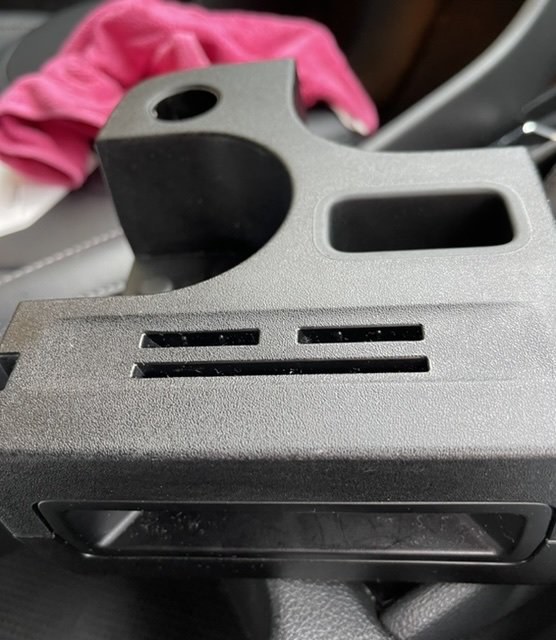
Slightly OT, does anyone know if this part opens up? Dropped some coins inside and be nice if I can get it out
-
Found vent covers on Amazon and ordered. Not sure how well it will clip though so we shall see
-
The vent as an S-shape near the entry so would be bit of a challenge to hoover it out. Managed to remove the pipe after lifting some of the carpet. I didn’t disconnect the wiring to the seats as it’s long enough to get the seats out of the way. Very fiddly job but not too bad.
-
Finally removed the marble. It’s wedged in the right side foot well air duct. Metal marble as well so could’ve used a magnet but hey ho Didn’t remove all the trims, only enough to dislodge the vent. Will definitely buy mesh to cover the vent, any recommendations?
-
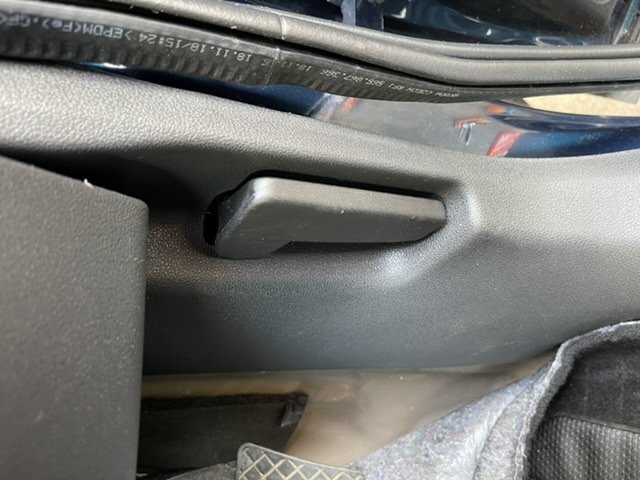
@varoom : do you know how to remove this lever please? Seems tightly screwed in. Found the ball it’s in the middle section of the vent so need to remove carpets and trims. Any instructions appreciated
-
Thanks again will have a go when I have a free weekend.
-
Cheers. The floor pan in the second pic is most likely where the marble ended up, perhaps via a duct in the first pic. This is definitely very helpful, cheers! Hopefully not too challenging removing seats, trim and carpet to access the area. p/s: on the first pic, do you happen to have a diagram of where the downward cable leads to? Hopefully it’s a floor pan that looks similar to the second pic.


