




jesperkpedersen
Finding my way
-
Joined
-
Last visited
-
Mine is similar but without head fog light function, and if switch is in position O and ignition is on, the low beam headlights is on and rear light is on. Unfortunately something happened (without any work having been done on the car) but now it's working in a very strange way. I can for instance not have only low (dip?) Main beam light when the switch is in the position "headlights"
-
I'm sorry responded to wrong posts 🤣
-
No work was done before the problem happened. It happened during a severe snow storm and heavy rain. A mechanical problem causing light selection to be basically reversed seems unlikely.
-
This have a single bulb with two filaments. No aftermarket installation. I have not been able to find a wiring diagram for my model, but i suspect that it have a central light control module as i can not see any light relays behind the master light switch as some modules have, and that there may have been water damage (i happened during a severe snow and rain storm) I decided to bite the bullet and my car go to the workshop next week.
-
It is the switch from the owners manual. It was purely ment to illustrate what i ment by "master light switch".
-
Only rear fog lights.
-
It is not high beam assist but "turn light on when ignition key is on" assist. On the image below you see the (master) light switch. The beam select is in the owners manual called the "operating stalk" containing the functions of turn signal, headlight, parking light, parking light flasher" Push the operating stalk forward, you have the high beam selected (long range light), normal position you have low beam selected, pulling back you get the high beam flashing (non locking position) 1) light switch off (O) position / beam select on LOW: headlight bulb HIGH beam ON / headlight LOW beam ON 2) light switch off (O) position / beam select on HIGH: headlight bulb LOW beam ON 3) light switch on POSITION lights only / beam select LOW or HIGH: headlight OFF (this is working as normal operation) 4) light switch on HEADLIGHT / beam select on LOW: headlight bulb HIGH beam ON / headlight LOW beam ON 5) light switch on HEADLIGHT / beam select on HIGH: headlight bulb HIGH beam ON With light switch (as show below) in the off position (in the O position) it should not be possible to switch to high beam on with the operating stalk except flash your HIGH beam by pulling the stalk. I hope this cleared up some of the confusion.
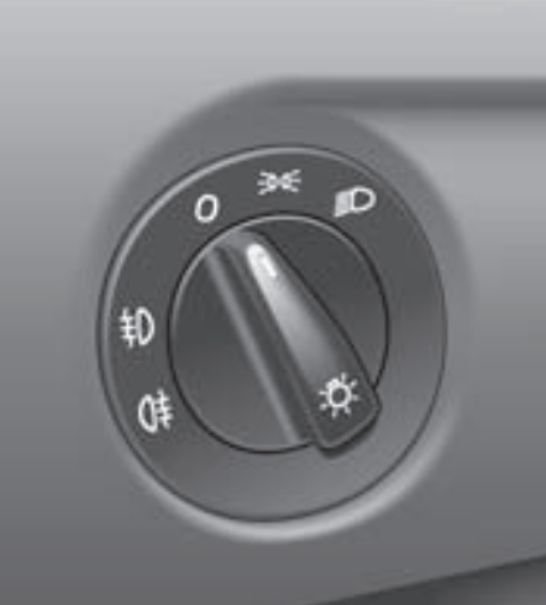
-
jesperkpedersen changed their profile photo
-
I have a Skoda Fabia Mk2 1.2 BBM/CHFA/5J - build year 2009 My car suddenly experienced a problem with selecting high/low beam setting. The car have automatic driving light When turning the car on the following switch settings give the following results: Master light switch off (0) position / beam select on LOW: headlight bulb HIGH beam ON / headlight LOW beam ON Master light switch off (0) position / beam select on HIGH: headlight bulb LOW beam ON Master light switch on POSITION lights only / beam select LOW or HIGH: headlight OFF Master light switch on HEADLIGHT / beam select on LOW: headlight bulb HIGH beam ON / headlight LOW beam ON Master light switch on HEADLIGHT / beam select on HIGH: headlight bulb HIGH beam ON My mechanic told me that it was probably the master light switch that was giving the problem. I did not follow his reasoning but I replaced it with the same problem persisting. Any ideas of what the problem may be? Any suggestions are greatly appreciated.
