AndreiA
New here
-
Joined
-
Last visited
-
Thank you for the info! 7th and 8th characters of the VIN are NJ. NV or NJ is mk3? 10th character is F so what does that say about the year?
-
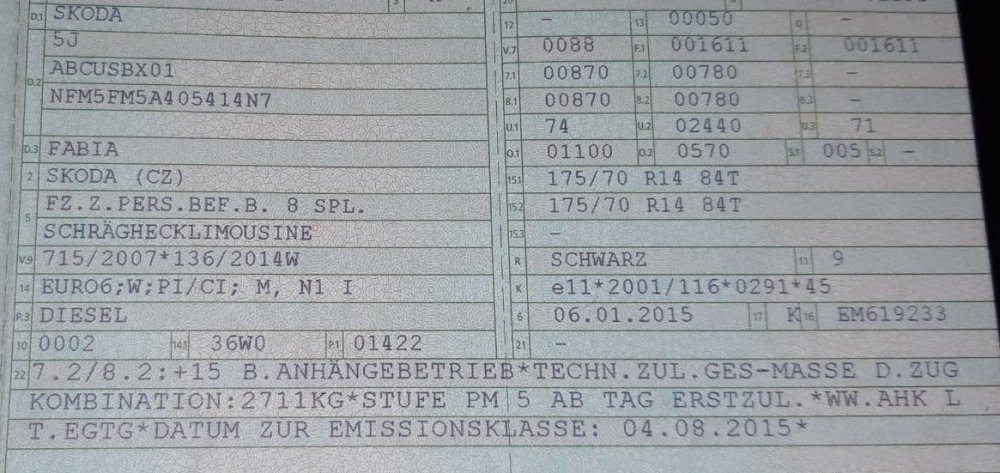
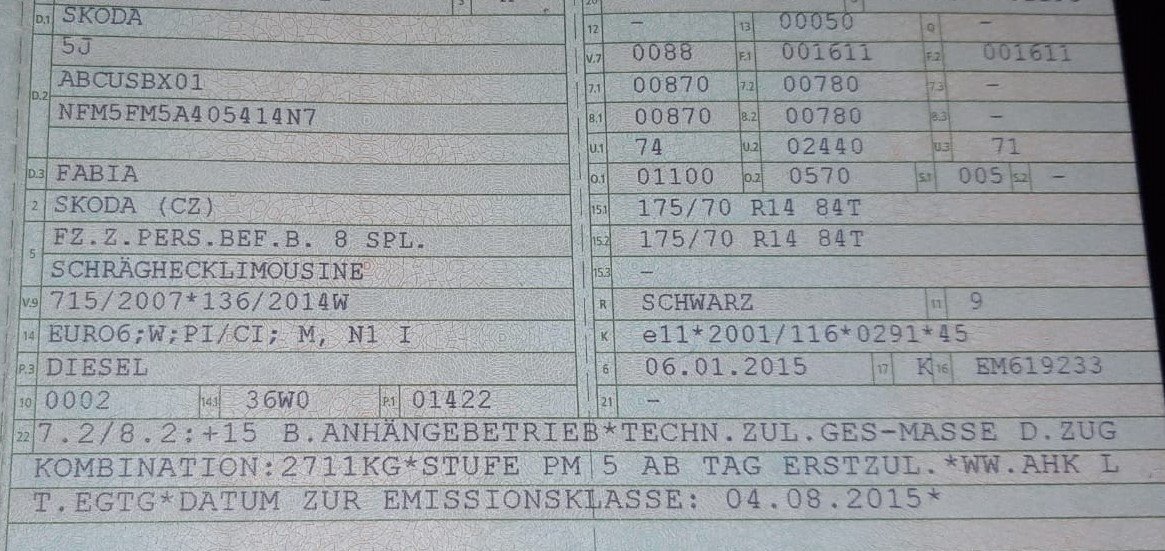
Hello everyone! I am currently thinking of making an upgrade from the Mk2 Fabia that i am currently driving to a Mk3. With the current higher prices because of chip shortages i can`t say that it is easy with my budget and my desired features. I found one at a local dealer in my country. It`s a 2015 1.4 TDI 66KW 89HP Skoda Fabia Mk3 Limo Edition (dealer description). It has almost all the features i am looking for: climatronic, cruise control and automated pilot features, heated front seats, electrical windows front and back, led day lights and so on. Mileage/kilometeres 86.000 Km which is nice for a 2015 car, looks and sounds nice. VIN verification turned out ok, service records show no major malfunctions or accidents, seller provided German vehicle registration document (1 owner before German dealer which sold it to my dealer). I will go check it out in a couple of days but i have some questions: 1. What is the correct date when the car was built? In the registration document the registration date is 04.08.2015 but in the document at number 6 there is a date: 06.01.2015. Ckecking out the information from https://www.tuningblog.eu/en/kategorien/tuev-gesetze-verbote/fahrzeugschein-323218/ that number coresponds to 'date to K' Can someone pls tell me what is date to K? Basically i am trying to determine the age of this car since it was built not the age when it was first registered. 2. Are there different versions types/variant/versions of the same engine (1.4 TDI) and same manual gearbox? What got me nervous a little is that on the vechicle registration document (pls see attached document) it says 5J and i saw that 5J is generally present in Skoda Fabia Mk2. I saw that on Mk3 we mostly find NJ or 6V description and i don`t know the difference in specs and performance betweend 5J and NJ. Is the any difference between a 5J 1.4 TDI 66KW 89HP Skoda Fabia Mk3 and NJ or 6V 1.4 TDI 66KW 89HP Skoda Fabia Mk3 (same year)? Newer models 2017,2018 and so on of 1.4 TDI 66KW 89HP Skoda Fabia Mk3 with the same features have better engines or manual gearbox (let`s say the same Fabia Mk3 1.4 TDI with the same specs but 2017 or 2018 model)? 3. I coudn`t find the Limo edition of this Skoda Fabia or any other Fabia for that matter. Does anyone know anything about the features of this particular model and what was the price for this particular car when i was new? All i could find is that based on version number. I found a Netherland car report that says the initial price on this car was a little over 20.000 Eur (pls see attached). 4. Is there any chance this Fabia that i am intrested in buying could have Smartlink or Mirrorlink (preferably Smartlink :)? As far as i can see this car was probably produced at the end of 2014 or beginning of 2015 and i read that Smartlink was introduced of Fabias starting with June or July 2015. 5. In case the answer to question no.4 is no can i buy an upgrade to MIB2 maybe Columbus or something else? Does it work properly? I only want to be able to use Android auto app and Waze, Google Maps, Youtube Music directly on my car screen. For these apps do i need DAB or SIM? I was looking at this site http://vagtec.co.uk/eshop/skoda/fabia/mk3-fabia-2015/genuine-skoda-oem-part-columbus-navigation-headunit-mib2-with-dab-with-sim.html but atm i don`t know what model to enquire about. I will read further and send them an email. Any advice here? What can i buy to use the apps? Is it possible to use them on an older model? 6. Any other advices or tips before verifying and hopefully purchasing this car? Thank you! NJ-899-P autorapport.pdf