




Roadrunner88
Finding my way
-
Joined
-
Last visited
Everything posted by Roadrunner88
-
Thank you for your suggestion.
-
Hi, I have noticed that the image on the screen inside the car was fuzzy and thought the camera needed a clean. It looks like a stone has hit the camera on the front of the car. Does anyone know what is involved in replacing this? Thanks
-
The 15 A fuse was the one - all working now. Thanks again.
-
Thank you for your advice.
-
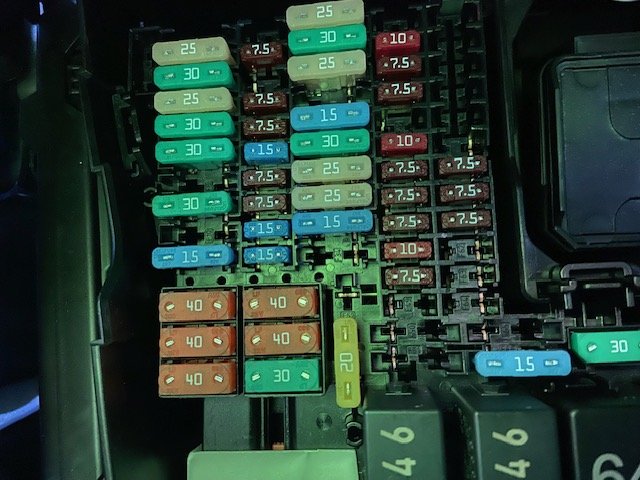
The details in the handbook do not match the actual layout of the fusebox on the car. I am looking for the rear wiper fuse to piggy back on that. Please see attached photo from the cat this afternoon.
-
Right hand side of engine bay when looking at the car with the bonnet open.
-
Thanks. Want to check that the contents have not been contaminated. It’s a diesel 200ps DSG SEL estate.
-
Hi I need to find and inspect the pump on the screen wash on my car. Can you please tell me where it is and how to remove it. Thanks.
-
I have a 2021 SEL 200hp auto Diesel estate from new 14/5/2021. Since then it has been with the main dealer for 25 days spread over a number of visits trying to find the cause of the coolant leak. It was diagnosed to come from a faulty bleed nipple on the secondary radiator in November and was fixed. Today whilst on business, miles from home the warning light came on and I had to stop by the roadside. Skoda Roadside dispatched a specialist who topped up the system with 600ml of water and completed a pressure test. All was fine and there were no signs of a leak anywhere. This is a contract lease car, there is the possibility that the coolant is going through the EGR Valve but this had been discounted by the dealer. It is clearly going somewhere. Question is - has anyone else had this experience and do I reject the car as not being fit for purpose. This issues started 3 days after i collected the car from the dealer and I have a record of every interaction with the Skodas dealer. Appreciate your feedback and advice.
