MrZ
Finding my way
-
Joined
-
Last visited
-
Took it to a mechanic today and they think it's a worn out bearing of a radiator fan. As far as I understand fan turns on together with the AC system. Sometimes it takes 10/20 seconds for the whining/whirring sound to appear after we turn on the AC. The sound doesn't change with the revs so the radiator bearing fan makes sense. When driving it's hard to hear it inside the salon, it's more noticeable at traffic stops. Will be interesting if the dealer will agree to fix this issue.
-
I can do that. You can definitely hear this "eeeee" sound with blower at 1 and doors/windows closed. It is less loud but you can hear it. I'll try remove the leaf as well
-
Hi, Just bought a 2015 Skoda Fabia from a dealer. Whenever AC is turned on there's a relatively loud whining noise coming out of the engine compartment on the driver's side. I think it's coming out of the AC compressor. The whining noise immediately goes away as soon as the AC is turned off. Called the dealer and they're telling us that the sound is completely normal. I can hear this sound in the salon while the car is still and the AC is turned on at lowest fan settings. Here's a recorded video of the noise: I really don't think this is normal? Do you guys hear such a noise on your Fabias when the AC is on? Can you hear it in the salon? Thanks
-
Thanks for all your replies. Car was sold so I guess someone thought it was definitely a good deal Overall I feel I shouldn't be worried too much about low mileage and focus on servicing of the car. Cheers!
-
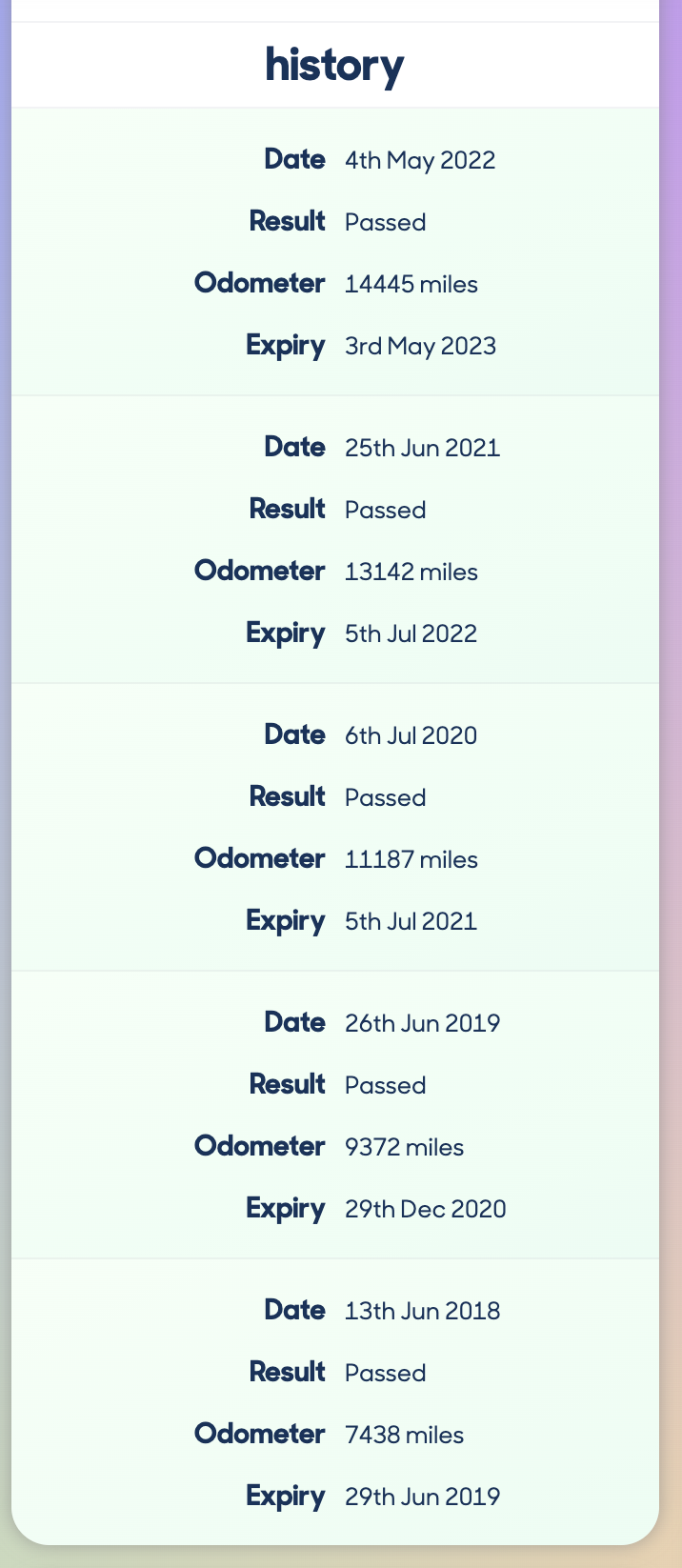
@roottoot 1.2 TSI 90 SE L 2015. MOT picture is attached. It had service history every year except 2021 because of Covid. Car is near London but I don't know where the owner lived. We don't know where the owner kept the car. The condition of the car visually is very nice. @nta16 I'm particularly interested in mechanical parts not interior. I'm not concerned with brake fluids, tyres because those things I can easily check if they were serviced or tyres changed. This article kinda outlines what I'm talking about and the issues I'm worried about: https://www.motorbiscuit.com/why-an-ultra-low-mileage-car-could-be-a-maintenance-nightmare/ A 14,000 mile 2015 Fabia is quite unusual.. The average is about 50,000. I cannot talk to the owner and find out how he drove it or kept it. But I want to decide if it's reasonably safe to good to go for such a car if it was properly serviced every year. It could well be that this car had periods of 9 months or more where it was not driven or it could be the owner did a small trip every day. i don't know but I have to make a choice. So let's assume the worst.. Let's assume this car was sitting every year out on the road in the sun for 9 months unused but was properly serviced each year. And it's sold at great value - would you buy it or walk away? Thanks
-
Thanks for your replies. All very useful information. My main interest is how much components like plastics and rubbers degrade if the vehicle is not used much. If for example it was used in summer mostly and then sat unused for 6 months. I want to just make sure that I'm not going to buy a car where all the rubbers/plastics deteriorated from not being used and all kinds of issues will develop.
-
I'm very interested to buy 2016 Fabia with only 14,000 miles on the clock. It has done on average about 2000 miles a year. For the miles it has done it seems a great deal. I would be buying it from a Skoda approved dealer so it would come with a warranty though I'm not exactly sure what it covers. My worry is that this car must have spent a lot of it's life being not driven around and wondering how it affected the various rubber or plastic components or rusting etc. I'm buying my first car so I really don't know much about this. My other thought is... If Skoda covers it for a year and I plan to use it a lot would 1 year of serious driving root out all the issues? Appreciate your help!