




RJon
Finding my way
-
Joined
-
Last visited
-
Thanks for asking, but no, I haven’t taken it back yet. To be honest I’m fed up with taking it back to the dealer. The car has been 15 months of endless problems so I’m selling it next month.
-
Thanks. It's clearly a faulty switch then.
-
I agree - but I can't shift the cover, so I'll have to take it back I guess. Can anyone else with a mark IV confirm that their switch looks different to mine please?
-
That's certainly possible. Although the garage said they hadn't touched the switch - and since the unit is on the opposite side of the car it's difficult to understand why they would?
-
Thanks for all the help. My switch feels like it's going through a series of small notches, before a definite click in place. And yes I guess it could have been inserted upside down by the manufacturer of the switch - but it shouldn't have made it into the finished car like that. And has it been off for the last 9 months without me knowing.... bit worrying really, given all the other glitches I've had with this car - I've lost track of how many times I've taken it back now...
-
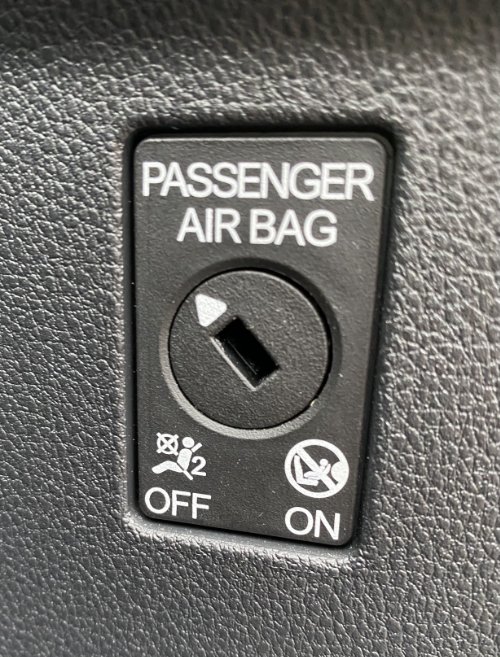
Yes it turns fine - thru 90 degrees. But compared to that picture in the manual, the centre dial of mine looks like it's upside down. If you imagine it pointing in the opposite direction, then it would be pointing to ON in the photo I showed. Whereas the only way to read it at the moment is that it's OFF.
-
Me too. It was in the clockwise position (90 degrees to the right) when I picked it up from the garage. In that position the Airbag OFF warning sign shows. The garage switched it to where it is now when I took it back...
-
Sorry, forgot to add photo...
-
I took my iV hybrid into the local dealer last week to get the gateway control unit replaced under a 'service campaign'. On picking up the car, I was asked if I knew the passenger air bag was off. I didn't, but presumed I'd hit a button somewhere by mistake. When I got in the car, sure enough the warning sign for the airbag was on above my head. But on reading the manual the only way to turn the airbag off was to use the key in a switch inside the passenger door surround - which I'd definitely not done - and when I looked at it, the switch was still turned towards the 'On' symbol. I went back to the garage - they said the warning sign was correct and the switch needed to be in the other position - which to me looks like it's off - and they left it in that position (see photo). Can anyone let me know what position the switch is on their car in when the airbag indicator inside says it's ON? The instruction manual has a picture of a switch which looks rather different to mine - almost as if the centre of the switch on mine is upside down! Anyway at the moment I don't know if the airbag has been off all the time without me knowing, or if it's off now but the indicator doesn't report it. Not an ideal position either way!! Any help appreciated...
-
Just some information for those owners being asked to renew their Skoda Connect subscriptions (for Infotainment Online, and Care-Connect Remote Access). Because of all the software issues I've had with the infotainment system in the last year, and all the other problems I've had with the car, I emailed Customer Services and asked them to give me a free year's subscription - on the grounds that many of the functions of the system had been hampered in the first year by numerous software and hardware glitches. In response, to my surprise, they agreed that would be reasonable. I had to pay for the annual subscription up-front - and send them the invoice - and they then sent me a cheque (for £80). I know I'm not the only one, by any means, to suffer from these problems - so I suggest anyone else who has had problems should try contacting Customer Support.

