



Fabiafan6
New here
-
Joined
-
Last visited
-
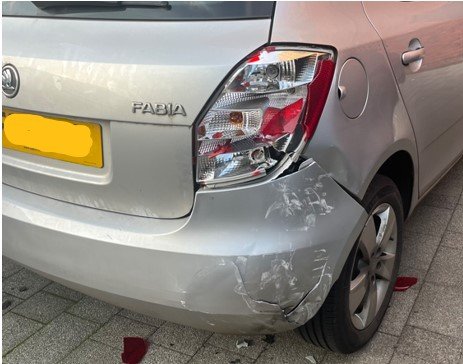
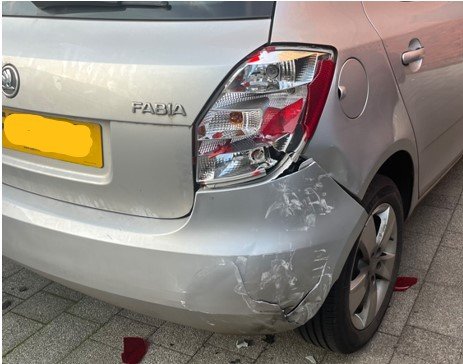
Hi - I am after some advice please - my lovely little skoda fabia was reversed into whilst parked, and damage done to the lights and bumper (see pic). Although the car is 2013, there was nothing wrong with it until it was hit. Does anyone have an idea on how much this would be to fix? Would welcome your opinions, thx
-
Fabiafan6 changed their profile photo
-
Hi - It is a Fabia 1 HTP 70 - 1198 CC Petrol. Grey/Red interior. So a basic model, but definitely got life still in it, apart from the battery and the driver electric window everything else is OK, and has never let me down (think that's why I'm so attached to it!) - thanks for your advice.
-
Hi - I am looking for some advice please from any forum experts - I have a 2007 (57) skoda fabia, that has been sat in my garage for the last couple of years, so MOT is currently expired. I don't need the car anymore, so I am looking to sell it, but I am not sure whether to sell as scrap value or put through an MOT and try and sell. It needs a new battery, and the drivers side electric window does not work, and had an advisory & minor defect on its last MOT 'nearside drive shaft joint constant velocity boot severely deteriorated' and 'offside front sub-frame pin or bush worn but not resulting in excessive movement'. I don't know enough about the MOT faults to know whether it is worth me paying to fix to try and get a better price, or whether to sell at the scrap rate of £296 without an MOT. Any thoughts/advice gratefully received!
