




rezki
Finding my way
-
Joined
-
Last visited
-
I have Android version 13 and is still disconnects sometimes.
-
Hi Since I got rid of redmi note 9, replaced with Samsung s20 ultra, the carlink 5 is working fine with vpn off. I rarely get a disconnection.
-
I tried to glue it to no avail,
-
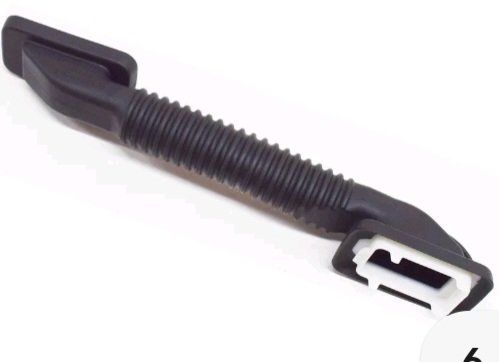
I am sorry too, to bring the thread back to life 1 year later. After a successful rear dashcam fitting I broke the plastic bits under the rubber on kodiaq 2018 which they don't look like the onceon octavia. I was very careful but because the plastic is not flexible it broke easily. It only cost £9 to buy but replacing it is an impossible task. Any tips will be a tremendous help. Thank you.
-
Anyway, I managed to do it bit I broke the white plastic catchers under the rubber. Any idea how to replace them
-
Hi. Thanks for the details, I am thinking of threading it through the trim too, but would the cable be squashed against the hard plastic trim where it comes out to the camera. Specifically when it stays there for a long time. Thanks again.
-
Hi I am sorry I forgot to mention that I have kodiaq 1.4 tsi 2018, it's completely different , it does not have 8 screws, it has 4 clips, 2 each side. I have just find out, on you tube that it also has 2 screws at the bottom going through the air filter to the top cover. Now, the difficulty is removing the whole box out. Thanks anyway. The link is for octavia, apparently the same as kodiaq
-
Hi I did manage to change the cabin one but the engine one is difficult to remove. Any links for instructions please. Thank you
-
I have the same problem with my kodiaq 2018, been updated to 2023. I , at first suspected my accent but many of my friends had a go to no avail. I don't have a problem with Google maps voice control thought.
-
Thank you for the explanation. My phone is redmi note 9 with android 12. Is working fine with a cable though, but not wireless.
-
Carlinkit 5.0 it works fine with carplay but not android. I tried everything. Maybe my car "Skoda kodiaq edition 2018" does not support it Carlinkit 5.0 it works fine with carplay but not android. I tried everything. Maybe my car "Skoda kodiaq edition 2018" does not support it
-
Yes I did and all the necessary settings.
-
Hi I have similar issues with my Skoda kodiaq edition 2018 everything works fine with the cable but wireless adapters work only on carplay iPhone but not android auto. I used carlinkit 5.0 with Xiaomi redmi note 9 and Samsung a70 to no avail. Any suggestions please Yes I did and all the necessary settings.
-
Hi I have similar issues with my Skoda kodiaq edition 2018 everything works fine with the cable but wireless adapters work only on carplay iPhone but not android auto. I used carlinkit 5.0 with Xiaomi redmi note 9 and Samsung a70 to no avail. Any suggestions please
