Matt54
Finding my way
-
Joined
-
Last visited
-
Thanks Steve. Fingers are crossed.
-
After my last trip to Skoda where they said they had updated the software, but it still displayed 1896 (same as it was when I dropped it off) my Octavia went back to the workshop today. To start with they said they could only do what Skoda would authorise (or something to that effect). I told them what you folks had said about 1941 and they updated it to that (just a shame they didn’t do it last time). So far so good, fingers crossed that it works. I’ll be heading for France at the end of the month, that’s where it has failed in a big way twice previously. Thanks to those who helped. I’ll report back in March.
-
I see you have the same software as I do 1896 & 2008. Skoda UK told me yesterday that I have the latest software. PoloPaul says 1941 is required. My car goes into the workshop tomorrow. I will see what they say.
-
Many thank for that info Paul. M
-
As a matter of interest. My Octavia had 1896 Software and Display Unit Software 2088. It went into the main dealer for investigation about the infotainment system crashes 10 days ago. They reported that they had ‘carried out a software update’. But the System Information still shows 1896 and 2088. How can this be? I’m going to call them tomorrow. They also said ‘customer to monitor’. Well I’ve monitored for a week now and it still crashes! Not as often as it does when abroad but it’s still indicates there’s a problem. What software version are other people on now? Have you had an update? Has anyone seen a cure to the problem? Matt
-
I’m now back in the UK and within half hour of leaving the tunnel everything started to work correctly. Only had one infotainment system crash a couple of days ago but it rebooted itself straight away. The car is going in to the dealer next week, let’s see what they say. There must be lots of error codes in there.
-
Many thanks for that suggestion. Although it seemed to reset the alarm the infotainment system continued to crash. I finally got it up and running by taking a drive out of the mountains where it all started. Currently it’s running fine but I’ll be heading back to where it all started in a few days so let’s see what happens.
-
After the screen has crashed then started again four times the SOS system crashes and remains in the crashed state until next day then the whole cycle starts again. Is there any way to disable the SOS system temporarily?
-
Hi I posted here back in November. I was out in France and my infotainment started playing up the day after we arrived, it had worked perfectly all the way down France. Once we got back to the uk it behaved itself. I’m now back in France and exactly the same thing has happened on the day after we arrived at exactly the same spot on the same road. The coincidence of this makes me think this is something to do with location. The screen will not stop on now but boots up then after a minute it goes off, then reboots and keeps cycling like this until it eventually goes off altogether. this has got to be something to do with location……and software. any suggestions?
-
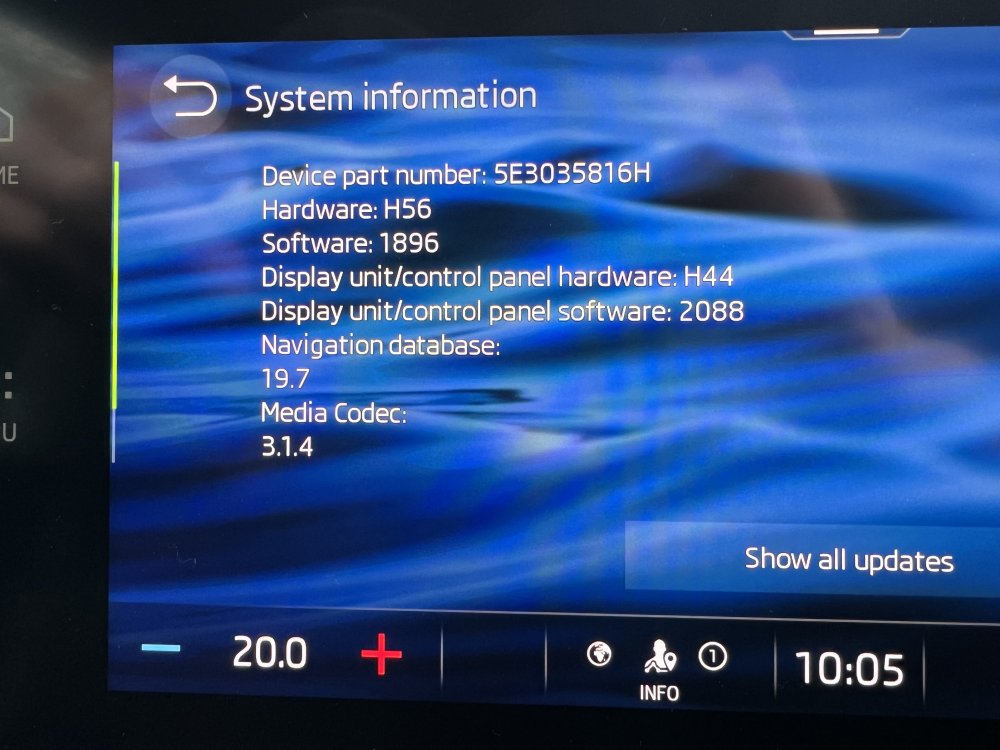
I’m currently on H56 and 1896 with H44 and 2088 for the display unit software.
-
I tried this but unfortunately it made no difference.
-
My Octavia IV started doing exactly the same yesterday whilst on holiday in France. I noticed a few folks on here suffering problems whilst abroad, is that just a coincidence or a possible cause. I managed to get things up and running again by long presses on the ‘on’ switch for the infotainment system which booted it up again over and over again (someone else on this forum suggested that was the way to get it going, thanks it worked). During one of the many short periods the system was ‘working’ I managed to shut off the “Streaming via integrated data connection (eSIM)” setting. Following that the system started working correctly again. Was it just a coincidence or could the cause of the problems be a fault whereby, for some reason, the system can’t send data out, sees this as an error so shuts itself down. I had just passed through a tunnel when the problem started. Just a thought.