



Skip to content

DavidRE

Finding my way
  • Joined

  • Last visited

Everything posted by DavidRE

  1. There were map files in the Mib1 directory in v393 but for some reason the system didn't pick them up. Beats me. I'm assuming the psf files are teh maps - they have some size to them Just downloaded v353. The mib1 folder is 23Gb, mib2 is 9Gb I'm assuming I just load the SD card into the unit with both folders as extracted from the zip file...
  2. Thanks - was helpful but the link to latest maps is broken sadly. It points to a VW download - I assume that wouldnt work anyhow
  3. Well that sucks. My maps are from 2015... Guess I'll stick to using the phone. Unless someone can find me a pre-350 update, which would be an improvement. Weird that there are still files in the downloaded in a folder called Mib1
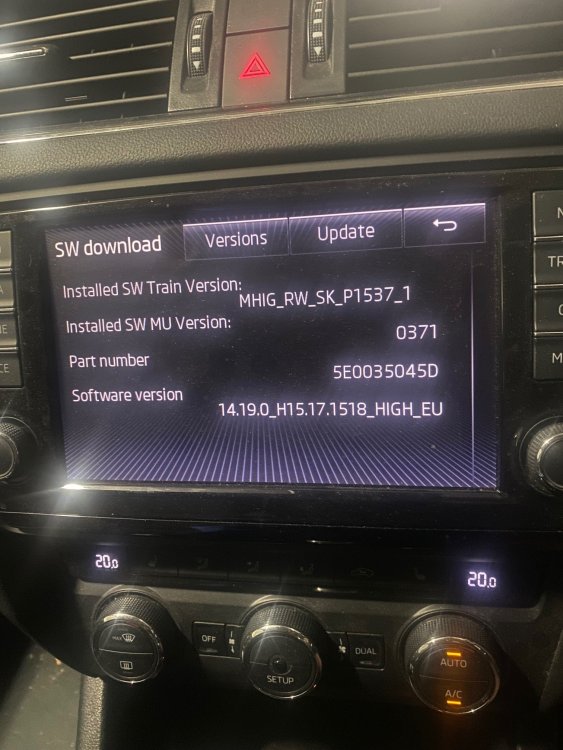
  4. Tanks for this thread @MartiniB appreciated. So I download data. My Skoda Octivia III (Mib1, early 2015, Australia) reads the SD card properly when I enter setuhp mode through "Menu", but N/A comes up on the list of updates under NavDB and even though it seems to be recognising a new version of Austrtalian map data it wont allow it to be updated. If I try and update the map data through Nav/Settings it doesn't recognise the SD Card. Any clues?
Important Information

Welcome to BRISKODA. Please note the following important links Terms of Use. We have a comprehensive Privacy Policy. We have placed cookies on your device to help make this website better. You can adjust your cookie settings, otherwise we'll assume you're okay to continue.

Account

Navigation

Configure browser push notifications

Chrome (Android)
  1. Tap the lock icon next to the address bar.
  2. Tap Permissions → Notifications.
  3. Adjust your preference.
Chrome (Desktop)
  1. Click the padlock icon in the address bar.
  2. Select Site settings.
  3. Find Notifications and adjust your preference.