




Lanc_AJC
New here
-
Joined
-
Last visited
-
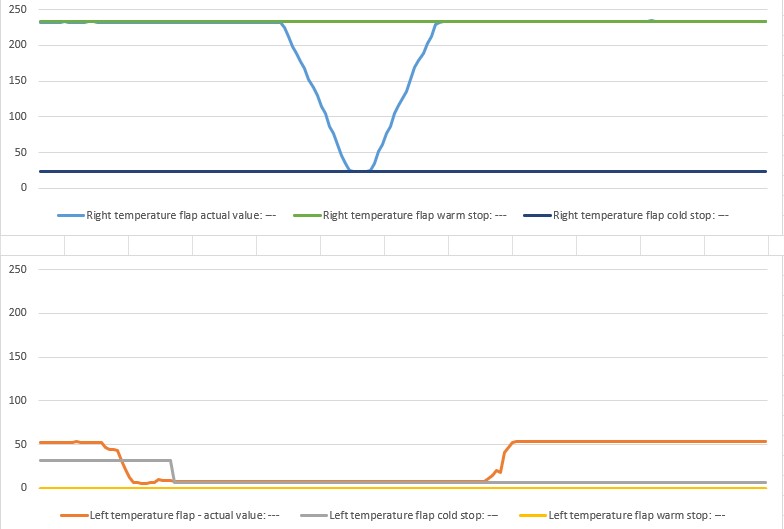
As far as I'm aware it's VAG (hard to check once it's in) I've run the flap calibration (both by pressing the button combo on the console, and through the basic settings in OBDEleven) - looking at the chart the right goes from 230-23 and back again, I can see the end stop values update. The LH motor visually appears to go through a full range of motion but (a) the value in the data is only going from 50-10 and back) - the cold stop adapts, but the warm stop remains set to zero (I'm assuming the calibration routing has a range for "valid" calibrations I know your poin t about new <> good, but it's failing at the same point in the range as previous, which seems too coincidental to be replacement with a bad motor. Tempterd to take the front panel out and check what voltages I'm seeing at the pot power supply and output. how easy is it to get the trim off (2013 plate car, so the plastic is probably a bit brittle by now)
-
Got the codes: B108C71 - Left temperature flap positioning motor Actuator jammed B108C54 - Left temperature flap positioning motor No basic setting B109411 - Potentiometer für Stellmotor der Temperaturklappe links Kurzschluss nach Masse B109415 - Potentiometer für Stellmotor der Temperaturklappe links Unterbrechung/Kurzschluss nach Plus The same codes were there before they swapped the motor out (I reset them again since just to check, they return)
-
I'll get the exact code numbers this evening but from memory it's left temp flap actuator jammed and left temp flap no basic data. I can see the motor go through full range of motion when the "flapaerobics" happens. Garage replaced this motor in December but the fault has persisted. I'd send it back by don't fancy spending another £200 to not fix the problem. Thanks for helping
-
Did you get this sorted - I'm on a 1.4TSI 2013 and have pretty much the same issue.