Xurde
Finding my way
-
Joined
-
Last visited
Everything posted by Xurde
-
-
Good evening Quizás la actualización 03A9 solucione la pérdida de señal https://www.skoda-auto.com/services/software-update-ice
-
-
-
-
https://www.mundodiagnosis.es/multimarca/39-comprar-elm-327-bluetooth.html Would this equipment be suitable to clear the error?
-
Thank you very much for your response. I will try to do the update SVM? Delete errors? Thanks
-
Thank you very much for your response. I will try to look for OBD elm 327 information to buy it and clear the error 1550.
-
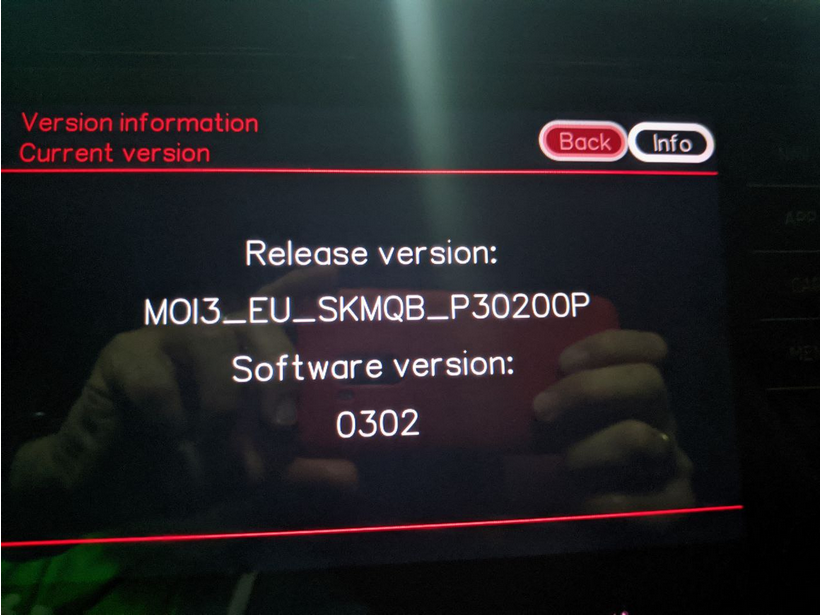
Hello everyone, I own a Karoq without navigation, I seem to have the same version as the Kamiq. According to what I read here I can update the infotaiment software. Now I have the MOI3_EU_SKMQB_P30200P version. can I try to update to 308 directly or do I need the intermediate updates? After 308 I jump to 330 also directly? After upgrading with the files on a usb, I need to clear some kind of error, I don't have any diagnostic tool? Translated with DeepL.com (free version) Thank you for your answers
-
-
Hello to all I'm Xurde, owner of a Karoq 1.5 TSI DSG from year 22. I am interested in looking for as much information as possible about my car, possible faults and solutions, prevention and maintenances to take into account. In short, everything possible to keep it without breakdown. 😇 Greetings to all and thank you for accepting me in this community.