Yoda1247
Finding my way
-
Joined
-
Last visited
-
I've just realised I should also have mentioned in my original post that recently the start/Stop button sometimes takes 3,4, or 5 presses to activate. It made me wonder if this is causing the issue as it may now be faulty?
-
Thanks. It's the first time the alarm has activated when I unlocked the car this way ( I had the key fob in my hand). The driver's door remains locked when the console button is pressed. I can open the passenger door and lean over to open the driver's door from inside.
-
Hi, Thanks for your reply. Yes, the driver's door locks when the internal lock button is pressed. Latest development this afternoon - I unlocked the car without using the key fob and the alarm went off!
-
I recently replaced the key fob battery. Yesterday it unlocked all the doors except the driver's door. Any suggestions/help greatly appreciated.
-
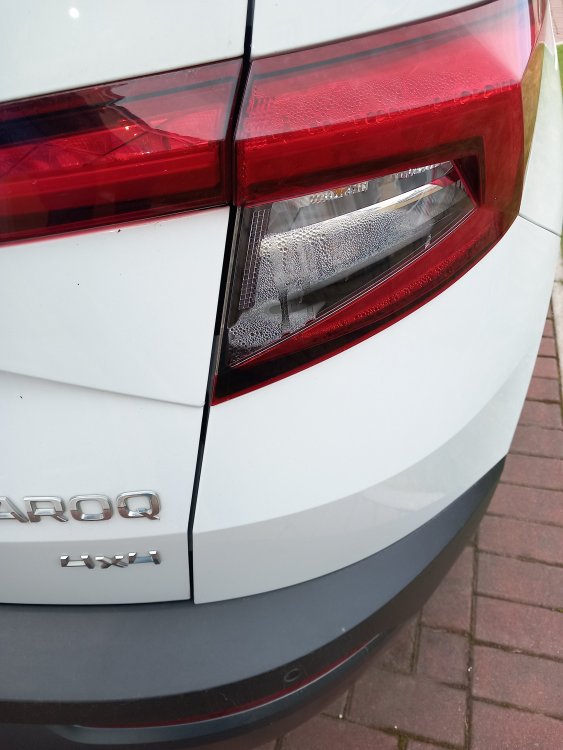
Thanks Skomaz. Followed your suggestions - removed the unit which is now almost dried out - it appears to have been the seal in the lampholder, which was the problem. One it's fully dried (hairdryer very useful here!) I'll re-install it and keep an eye on it. Thanks again. Much appreciated!
-
Thanks for your reply....it's the outer one. Photo attached.
-
I've been advised by my dealer that I should replace the rear light unit as there is quite a lot of condensation. Suggested cost was over £400! Thought I might try it myself but wasn't sure how. It's a Skoda Karoq 2.0 TDI Edition 4, 2018. Any help greatly appreciated.