Marc-Jackson1998
New here
-
Joined
-
Last visited
-
Thank you. Appreciate your reply, would you recommend bringing it anywhere to get it looked at in particular? I’m in north west England. Thank you. Appreciate your reply, would you recommend bringing it anywhere to get it looked at in particular? I’m in north west England.
-
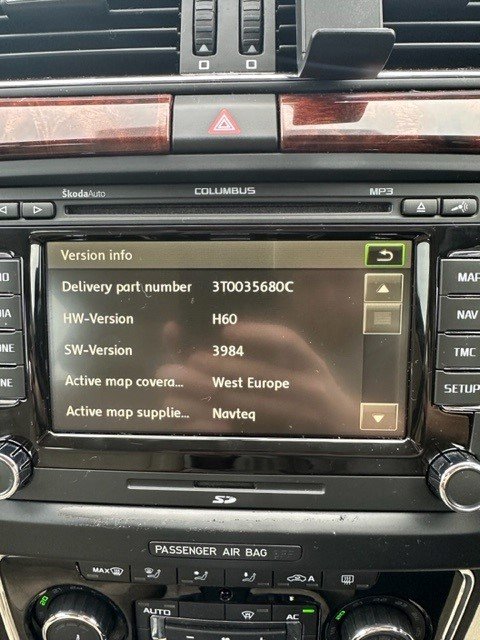
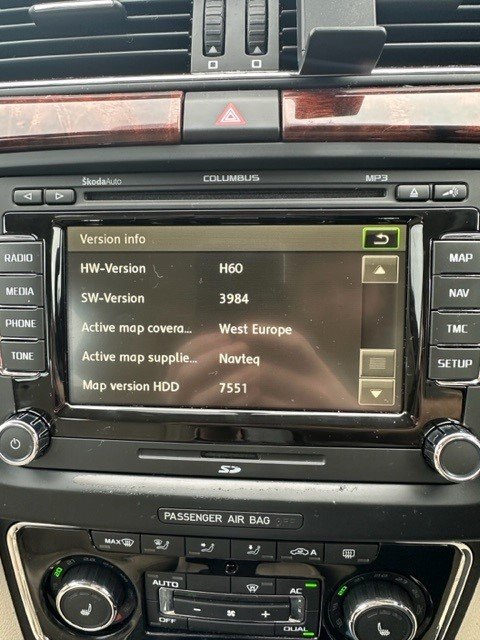
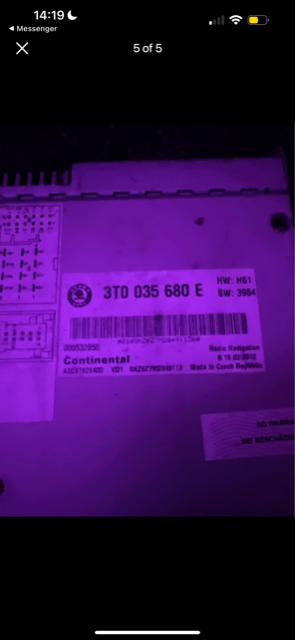
Hi guys, new to the forums here I have a MK 2 Skoda superb 2011 Elegance TSI. My Columbus stereo recently broke with what seems to be an issue with the wiring. (it was making a repetitive thumping sound through the speakers even when the car is off, and the screen kept trying to start up and got stuck on a loop, anyway i disconnected the speakers from the back however now its time to get the problem fixed. I have seen a replacement radio for sale online for a decent price (£100) but slightly different spec. Im curious would the replacement radio would be compatible with my car before I travel to buy this radio and fit in mine. I initially thought it would be a no brainer but a mechanic that i know told me that not all cars of the same make and model will be compatible in terms of chopping and changing radio head units. My car Spec - 2011 Skoda Superb TSI Elegance Replacement car spec - 2012 - Skoda Superb TDI SE Plus I have attached pictures below, pictures of screen are the radio currently in my car (now broken) third image is the head unit im looking to buy Any help would be greatly appreciated Many Thanks, Marc