BigEZ
Finding my way
-
Joined
-
Last visited
-
It worked for a day or two but then back to the usual random failure to connect. Actually, one additional data point to consider: whenever my car is parked in an underground garage, it FAILS to connect. This is 100% of the time. Does the phone need a live internet connection to connect to the car's infotainment system? I did not have this phenomenon with my previous Octavia that connected wirelessly with Ottocast Air1Air. Thoughts???
-
-
-
-
I'm moving this over to the Octavia discussion group, apparently I don't have the same infotainment system as Karoq
-
New Octavia (received it exactly a week ago). When I got the car, the representative demonstrated how Android Auto is wireless, and my car connected straight away. Then of course, the first time I started the car after leaving the agency it didn't connect. It sees my phone and gives me the AA logo but when I press on it I (eventually) get a message that the connection failed. When I reboot my phone it always works the first time. After that, hit and miss. I did a factory reset on my phone (at great pain!) and it worked fine for almost a full day, then it went back to sometimes yes sometimes no. Meanwhile I can't get it to connect to AA using the USB cable or my old wireless dongle (Ottocast A2Air) - neither is recognized by the infotainment system. I'm running AA 12 on a Pixel 8 so it's the latest version of both AA and Android. Anyone have any insights? I have an appointment to have Skoda do a full diagnostic on the car next week but they need the car overnight so this is a real inconvenience.
-
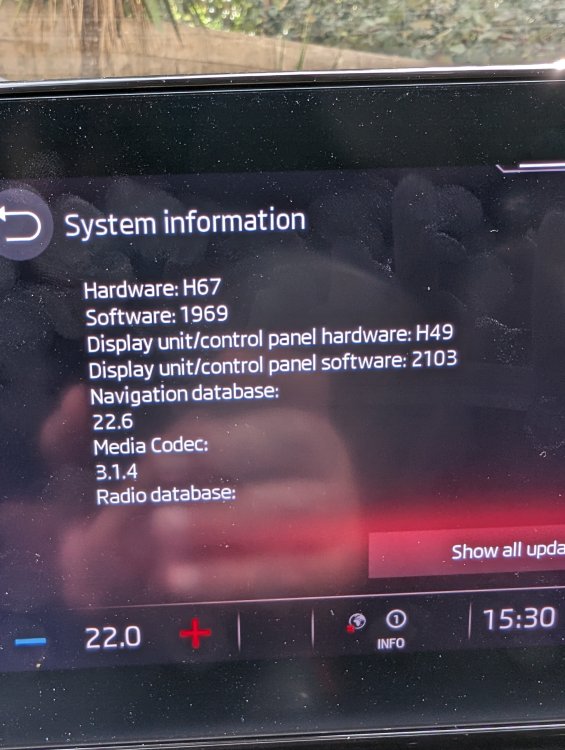
Here's what I'm seeing for system information. Looks like my SW version is 1969 whatever that means. When I clicked om "show all updates" I got a blank screen. Anyone have any insight?
-
How do I know if How do I know if I have the 0330 update?
-
From what I'm reading here this is not an Octavia problem so much as a Bolero (hence Skoda-wide) problem
-
Brand new Octavia - received it less than a week ago. Android Auto is wireless. Sometimes it connects fine and other times it won't connect. IF I reboot my phone it will connect. I can't get it to connect at all with a cable, and I tried using my Ottocast A2Air dongle that I used in my previous car but that doesn't connect either. I did a factory reset on my phone (at great pain) and it helped for about a day. Now it's hit and miss again. How can I tell what version of software my infotainment is using? How can I update it? (Or is the update pushed to me when Skoda decides?) Really a shame to put so much money into a car that is so smart but not have it perform a basic and vital function.