SideWinder_
New here
-
Joined
-
Last visited
-
@KomisPL so you upgraded to 1800 successfully ?
-
This is the update, latest upate is MEN3_EU_SK370_P3355L_1800
-
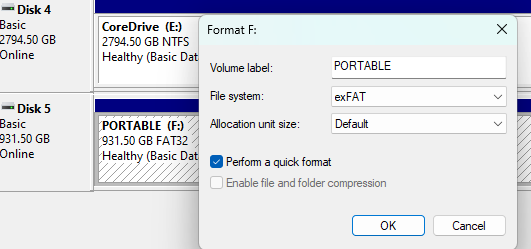
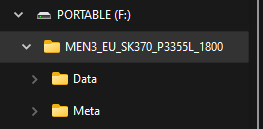
Wanted to take this opportunity to give a big shoutout to @varooom & @Rainesh for all the above and beyond assistance provided in this thread. I recently purchased a Skoda on a 22 plate which wasn't compatible with my Samung s23 Ultra when using Android Auto. Based on the information kindly shared in this thread, I took the challenge and upgraded from SW train 1760 to 1800. My Samsung S23 Ultra is connected immediately after upgrading with Android Auto . Very happy with the outcome... I did connect the battery to a charger, too as I was paranoid of bricking my system It took me a few attempts to prepare the USB drive so that the car could see the files on it, as I initially had the wrong folder structure. If anyone is unclear, I copied the unzipped files from 'MEN3_EU_SK370_P3355L_1800.zip' to the drive (Important to note, this is the version for my SW Train) with the folder structure (One main folder and two subfolders) /MEN3_EU_SK370_P3355L_1800/Meta /MEN3_EU_SK370_P3355L_1800/Data To prepare the USB drive, plug into drive into a windows pc, open 'disk management' and format the USB drive with 'filesystem' 'exFat', and unzipped as above. Thanks for all the helfpul comments..