Tycho
New here
-
Joined
-
Last visited
-
Thanks allot! I’ll check out videos and see if it’s something I can do myself
-
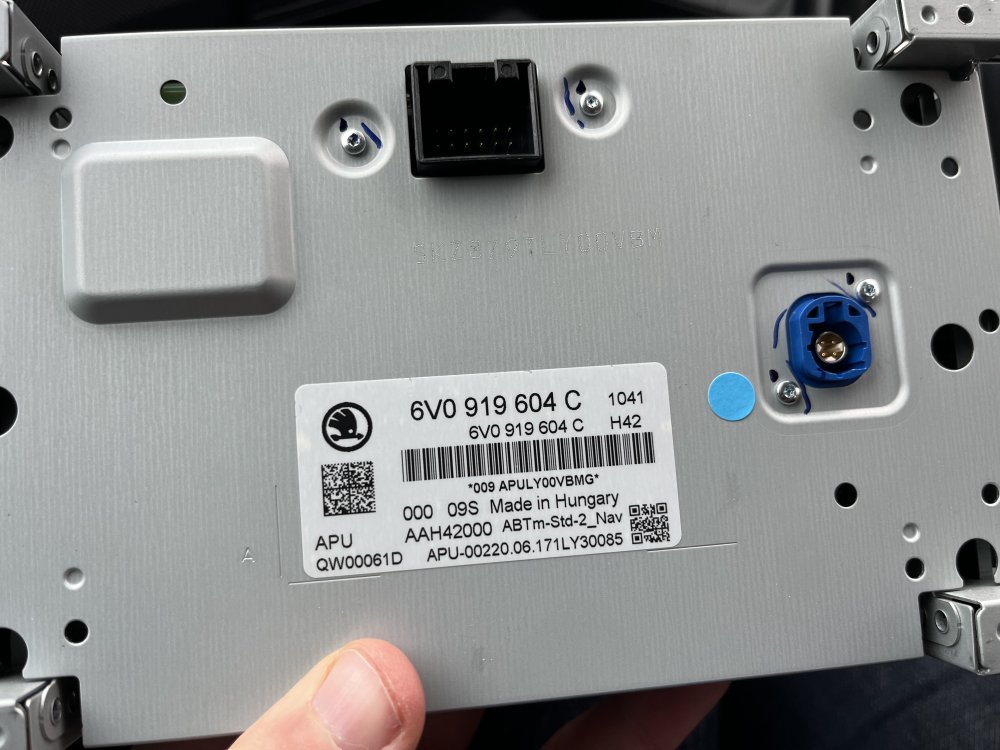
That sounds good! I've removed my unit, you can see it on the picture. Is it hard to remove and replace the screen? I couldn't find it on the Fabia forum. Maybe I'm not looking properly. Do you maybe have a link? Thanks for all the help, much appreciated
-
Thanks for the reply. I have a Fabia 10. Tsi. It has navigation if that is what you mean with satnavs. Attached there’s a picture of the model number when it’s removed and the radio itself is similar tot this model: https://www.ebay.co.uk/itm/196409967228?_skw=6V0919604c&itmmeta=01JCJ1HKB900HC6B9DWHCV9CPA&hash=item2dbaf2427c:g:rBkAAOSwn~VmUH6h&itmprp=enc%3AAQAJAAAA0HoV3kP08IDx%2BKZ9MfhVJKkZI6dXFD1%2Fs8bKS9qTNlX7PJT1VpgfoG6uUbWxc2wP3Rn3JmbHI9jdsY%2BuPDnJMLQ2rXedNQPvWWal3699at4iIy94nmSaVrM5e8P01BSdQRdfe0nRh2n3yyKX9ESNzQ9pV4ahkYMwhRLh5dSKupEdGxPDSRauJdO7bPs8t8e59NT3JtfKCzdkChGuzqbGcQKcvP1aMsn63Cf40SjmEYn3hh0XLfDAc%2BTvGRlFnN6pfsFiR4%2FNPW1yLQsGdcASWBo%3D|tkp%3ABk9SR9i1xsHkZA
-
My radioscreen on my Skoda estate from 2017 is broken. From other topics I see I can replace the screen because it has no security lock. The item number of the screen is 6v0919604c. Now I have a couple of questions 1. Can I also replace the model with an 6v0919604b model (instead of the c model)? These are much cheaper second hand 2. I’m thinking about replacing the whole infotainment system for a system that also provides apple CarPlay etc. For this I have to remove the glovebox. Does anybody knows about a video how to do this? I removed some screws but it won’t come of thank you in advance!