KiloGr
Finding my way
-
Joined
-
Last visited
Everything posted by KiloGr
-
-
-
-
I had this, removing the car from your phones carplay list, then re-adding manually sorted it for me.
-
I can log into the Skoda app fine, just doesnt let me past the activate as primary user as to do so you need to log into the car itself, which is the part i cant do 😞
-
Found the globe you are on about, showing as white. Trying to do it, it says "Sorry, unable to load your settings". I have factory reset the infotainment system, same error.
-
Thanks for the info - they have paid (well said they will as asked me to invoice them) the £250 for the updates done yesterday. The car was sold with warranty which didnt cover software updates so they offered this off their own back. Ive found a garage about 2 hours away which offer to repair it for £100 - i dont think they take warranty work due to the process which i can understand, so debating whether to fork out the £100 and have it done properly once.
-
Hi Steve thanks for the reply. I bought it from an independent garage, so no updated would have been applied. Should the car connect to the internet itself or do i have to sign into wifi for this to work? I dont recall ever seeing a white globe, so not sure if there is something i need to do for it to come online
-
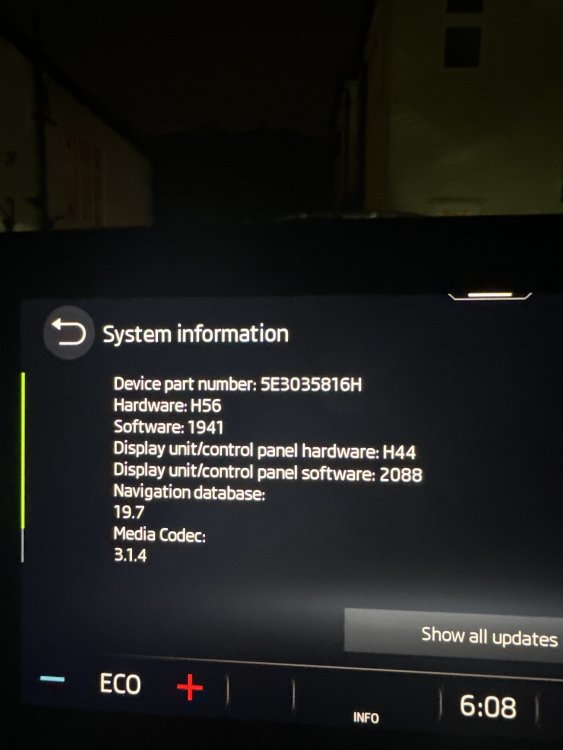
Hey all, picked up my 2021 Octavia IV on Saturday. Since then I noticed issues with the SOS popping, going offline and coming back online. skoda booked it in for software updates and SOS module update which they did today at a cost of £249. Driving home and the updates did nothing as the SOS is still popping and going offline. another thing I’ve found is whenever I try to sign into my ŠKODA account to add my user it says “sorry, this function is not currently available” trying to get ahold of the warranty company to sort the SOS issue, but wasn’t sure if anyone knew anything about the user errors. attached is a photo of what they have updated it all to (14/11/24)