CsW
New here
-
Joined
-
Last visited
Everything posted by CsW
-
The car is a plug in hybrid. I don’t understand why I don’t have those functions. not really sure what step to take next. Škoda technically saying that the function has been removed. Even though they are still in the cars manual?
-
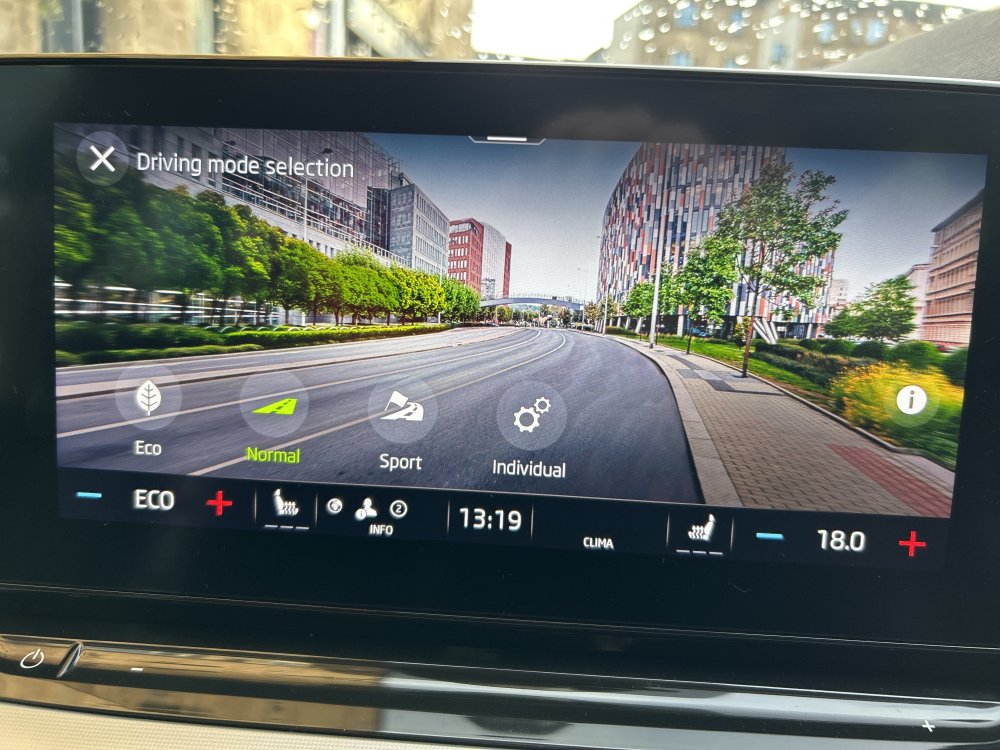
Thank you everybody for the comments. Basically I don’t have the options on my driving mode screen to select electric, hybrid or auto. I took the car to the Škoda Arnold Clark in Edinburgh. They said a technician looked at the car and that the options have been removed in a recent update. I just don’t think that it correct. please see photo of what I see on the drive mode screen.
-
Thanks for the reply. Eventually found the hidden menu which tells me the software my car has is 1969. frustrated by Škoda being dismissive but I don’t know why I wouldn’t be able to switch between modes when I want to. The options are just not on the screen despite being shown in a diagram in the cars manual and online.
-
I have bought a 2021 Škoda Octavia iV mk4 great car however on my drive settings I don’t have the option to change between electric, hybrid and auto mode as can be seen in the cars manual on page 71. I took it to Škoda and they told me this option has been removed to avoid glitching between modes. this means that hybrid mode only comes on when the electric battery is empty the. Both run together when the car regenerates as ot drives on the petrol engine. is it true that this feature has been removed and why would it be in the cars manual. thank you