jaffanator92
Finding my way
-
Joined
-
Last visited
Everything posted by jaffanator92
-
Got this checked out by my.mechanic and rang local dealer and the battery doesn't need to be coded
-
How do I check if this has been disabled previosily do I need to get a diagnostic scan done ? Or is there a visual element I can check?
-
Oh ok u presume a garge can tell.me this Would it be linked with the other parts not working also ?
-
I ment to say I'm not sure in the previous answer
-
I'm sure How would.i check that out ? I didn't even realise that was a thing ?
-
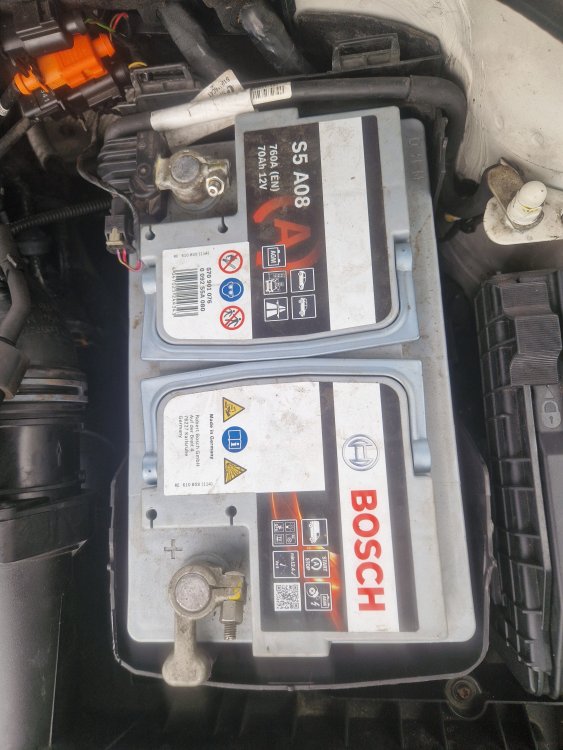
It is a auto start battery it's a bosch S5 AP8
-
Hi there I am having issue's with my mk2 skoda superb its a 2013 model 1.6 The auto stop start does not work and has not worked since a putchases the car in July 2024 I have got the voltage from the battery when it is not started which is 12.4 and the voltage when idle is 14.7 from what I have gathered online that seems to be fine and replaced the switch also but it was a second hand one ? The dash notified me everytime I started the car that it is an error There is also other issues with the car auto park it won't work or illuminate when pressed parking sensors work but will not turn off when button.is pressed unless you exit from the screen and heated seats won't work any longer but i am nearly sure this was caused by myself as I was installing a wirless charger over the sliding ashtray drawer and when I lifted the centre console out why torx spanner landed in the 12v ashtray plug and sparked out rotten luck but it was a fuse that i replaced and was fine but the seats stopped working in and around that time Any help.would be greatly appreciated