




Tedzsbegrease
New here
-
Joined
-
Last visited
Everything posted by Tedzsbegrease
-
-
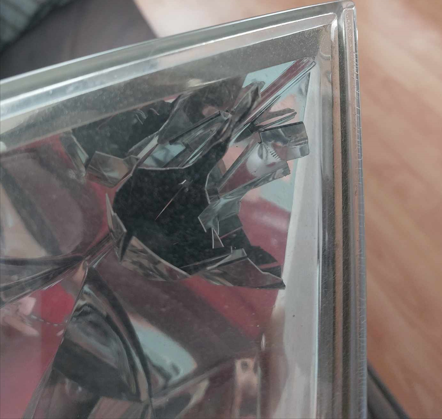
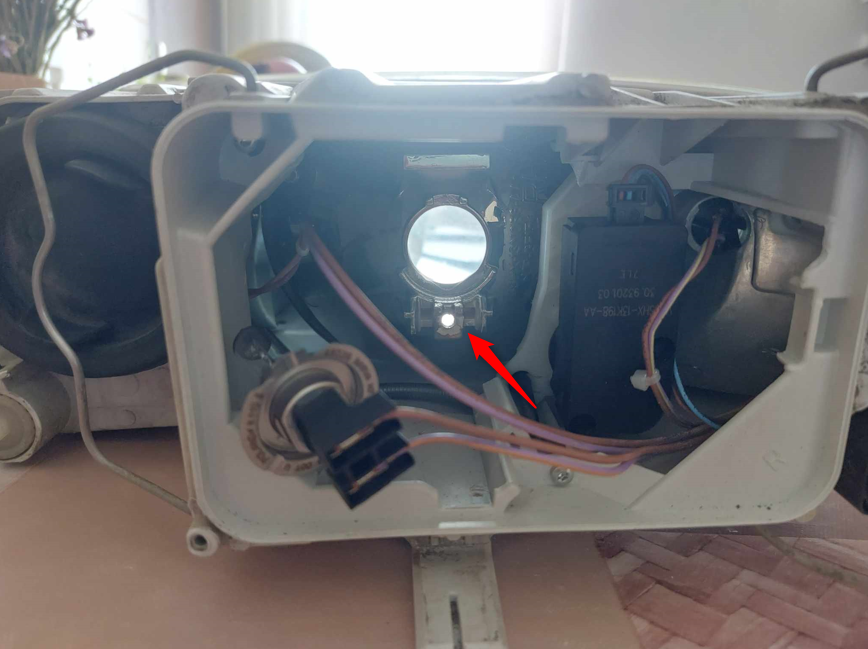
Hello all, asking my first question here. I have a 2008 Octavia with the reflector model halogen headlights (OEM if it matters). One day, the hexagonal reflector piece simply fell into the headlight lens, because a wrong screw was holding the reflector piece and the bracket that holds the low beam light bulb in place. This also means that the low beam bulb is pretty much floating in air, poking out through the hole:( I attached a picture of which screw am I talking about (bulb retaining bracket removed for convenience). My question is simple, what type of screw goes in there? I am afraid of taking the other headlight assembly apart to check, so I could use the info. Have a great day, Ábel
-
Hello all! I'm Ábel from Transylvania. I recently purchased a 2008 Octavia (petrol) from my lifelong friend, who kept the car in good shape as much as he could. This responsibility was awarded to me, as such, I look forward to tinker around with my machine, and keep its tip-top shape. I've read posts on this forum a lot when I was in the decision process, since I wasn't sure whether I was making a good decision. Luckily, I am pleased so far, so I can thank a couple of users for that. I'm looking forward to get some answers to any problem that may arise, but also to help others :) Have a great day to anybody who reads this!