




Steve348
Finding my way
-
Joined
-
Last visited
Everything posted by Steve348
-
Many thanks for the information, Morph. I did try pulling, but obviously not hard enough (for fear of breakage). The reason I wanted to take it off was to give it a thorough clean, but managed a passable job with it in situ. It will be good to know how to do it if I need to locate the control unit for the after-market reverse sensors which I believe is down there somewhere! Steve.
-
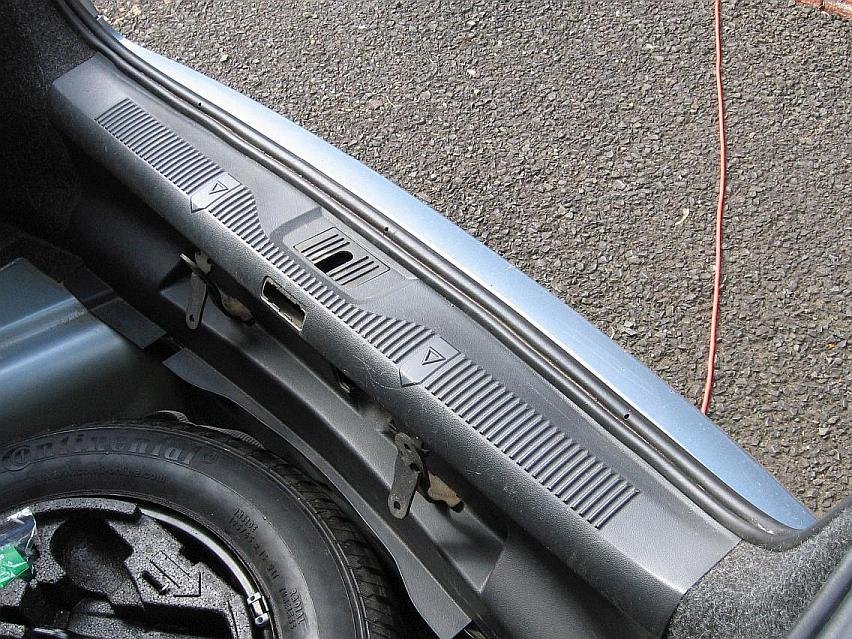
I am trying to remove the plastic panel that fits at the rear of the boot of my 2011 Octavia Mk 2 (attached picture). There are 2 plastic 10mm nuts at the lower corners which I have removed (though not really necessary because the panel is slotted). This frees the lower part of the panel, but it is still solidly held at the middle. Behind the little rectangular plastic insert at the middle there are the heads of a pair of Torx 40 screws. I have tried removing these (being careful not to lose them behind the panel!). This releases the tailgate latch, but does not free the panel, which feels as solid as before. Does anyone know how this panel can be removed? There could be clips, but I don't like to force things until I know what I am doing.
-
I took off the rear roof-light. Of course there was nothing behind. The sound was coming from much further back. It was then I noticed a little loud-speaker, glued to a plastic trim panel to the near-side of the parcel-shelf. I fixed some thin self-adhesive felt on it. The sound is still plenty loud enough, but a lot less painful! It's a bodge that rather offends me. If I can get motivated enough I will try to detach the carpet below the speaker to see if the control unit is in there. Possibly there might be a sound level pre-set but I have met a similar device previously and there wasn't on that.
-
I think you are right, though the paint over the sensors shows no evidence of having been painted after the rest of the bumper was sprayed. I'll see tomorrow if I can get the interior light off, since that is where the sound is coming from.
-
Thanks for the reply. I don't see anything on the Bolero. I am sure I do not have a Maxidot display -, at least I have never been able to get any sort of menu. Steve.
-
I have driven only 8mls in my 'new' 2011 Octavia (1.6MPI) and so far its only disagreeable feature is the audio level when reversing. I see in the instructions for the Bolero unit, that this should be controllable in the Tone/Balance setup. I had already discovered that the 'optional equipment' listed in the Service Schedule included the code 7X0 - Without Park Distance Control, so I was not surprised to find that the control does not exist. The visible parts of the PDC system (the sensors and four wires through a grommet into the bumper area) show every indication of having been factory fitted, but I suppose it is possible it could have been fitted as an afterthought. Can anyone suggest somewhere else where this sound might be controllable? The sound appears to come from the vicinity of the rear roof light, where the roof lining seems rather hollow. If the control unit is in here, maybe I could mask it with some sound deadening foam (unless someone can suggest a better plan). Steve.
-
I recently bought a 2011 Octavia (1.6MPI). I bought it online, unseen and untried, definitely a very bad idea (!), but there did not seem any other option at the time. I'm looking forward to trying it on the road, but I have only just sorted VED and insurance. I expect to have numerous question to ask in the appropriate area of this forum! Steve.