jimbocos
Finding my way
-
Joined
-
Last visited
Everything posted by jimbocos
-
Did you manage to figure this out? I'm having problems with my rear wiper and seems like it could be a similar problem.
-
Re-burned at slowest speed on a new CD-R and worked a treat. Also used a dedicated Burning application rather than Disk Utility. Now I can select different languages properly. Thanks heaps for your help!
-
Hmm seems PATA drives aren’t easy to find in my area. Maybe getting a bit too hard just to get this unit working haha. What about updating the firmware via DVD instead of CD. Any chance that could make a difference? Also do you know if the way it’s burned can affect how it’s read such as the speed or something like that?
-
Thanks mate. Managed to burn the .iso image to CD fine. Got half way through the update (44%) and threw an 'swl error' that looked fairly generic. I tried again, and it got to the same point, but this time said 'Error - HDD - Filesize mismatch'. It asked for a power cycle by pressing certain buttons which I did. I also tried burning the image again on a different CD at the slowest speed I could but now the infotainment system doesn't seem to even recognise the disc when I insert it now. Might be time for an aftermarket head unit upgrade 😥
-
Thanks heaps @pab567 So just burn the whole .iso file to a CD? Just realised I only have a 700mb one so will need to get an 800mb cd.
-
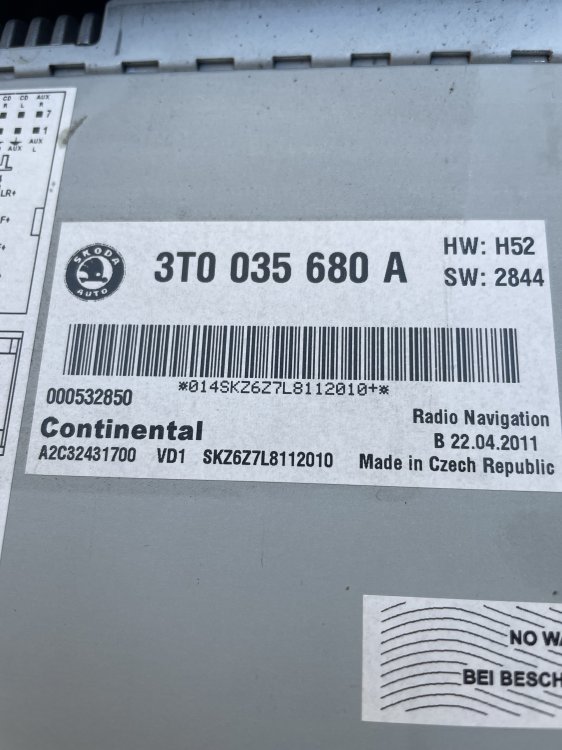
Hey @pab567 sorry about the delay. Here’s an image of the top of the unit:
-
@pab567 Hey mate. Trying to upgrade the firmware on my 2012 Skoda Superb (langage is stuck on German and I'm unable to select any other). Would you be able to send me a copy of that firmware for me to try update too? Thanks heaps. Also is it possible to do so on a USB drive? I have the adaptor cable.