Fredric
New here
-
Joined
-
Last visited
Everything posted by Fredric
-
Hi nta16, Thank you for your input, I haven't found any luck by searching any forums, which I have found many times before. This forum has helped me alot for the past 7 years with our Skoda. I have done all preventive and corrective maintenance on the car myself so far. I posted in the forum you suggested hoping to get some inputs. Best regards, Fredrik
-
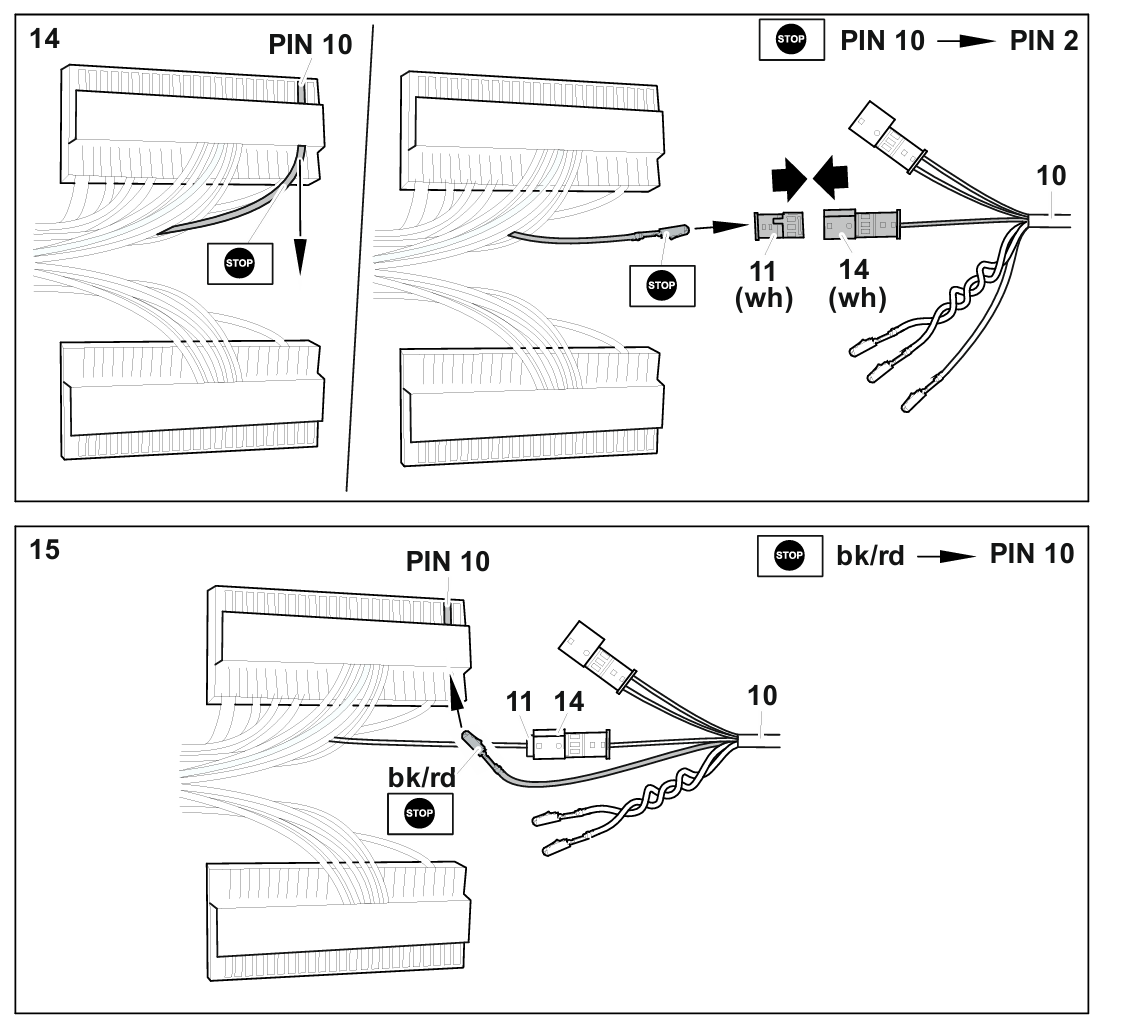
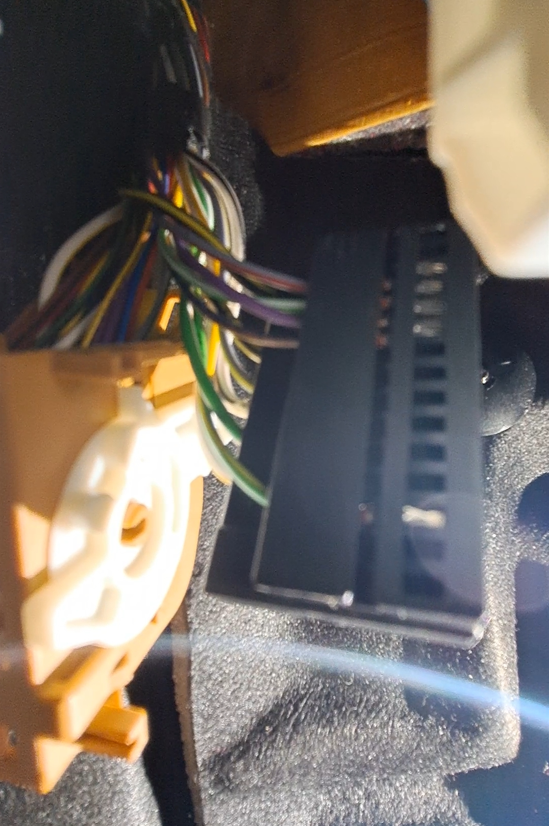
Hello, Crossposting from the Fabia forum, hope it is ok. The car is a Skoda Fabia 2018 Manufactured October 2017. I have installed a dedicated towbar and wiring kit from Westfalia, 317 114 300 113. Link to PDF can be found here: https://www.westfalia-automotive.com/fileadmin/pdf/e_anlagen/317/e317114391101.pdf On page 24, it says to unplug pin 10, but there is not a cable to that "port". Instead, there is a green/yellow cable connected to the port beside it, picture attached. I thought it might be an error from westfalias side, so I connected the green/yellow wire instead. (I think this is my issue. ) I proceeded to follow the instruction and finished the installation, the only other deviation is that I connected the ignition power to the wiring kit from the radar fuse instead (Step 28 in westfalias instruction) After installation, I started VCDS and activated the towbar via CAN gateway - Enable 69-Trailer. When I tried to connect to the trailer module, I got "Failed to connect" to the trailer module, VCDS could not find the trailer module. My question is, which cable should I connect to instead? Or do I have other faults? Westfalias instruction does not specify which colors the cable connected to port 10 has, so I am stumped as I do not have a wiring diagram for the car. I have tried to connect the towbar to a trailer, the taillights do light up, but turn signals, brake light and other functions do not work. I am very grateful for any suggestions and inputs, thanks in advanced. Best regards, Fredric
-
Hello, I'm from Sweden and currently drive a Skoda Fabia 1.0 tsi we bought new. I like to tinker with it, I have installed a lightbar behind the grille and auxiliary reverse lights. I sometimes try to hypermile with it and can go as low as 0.36 l/10km for 300 km journeys. I recently installed a towbar, which I have some troubles with the wiring, I'd like to get some help with that. I have it as another post in this forum. Best regards, Fredric
-
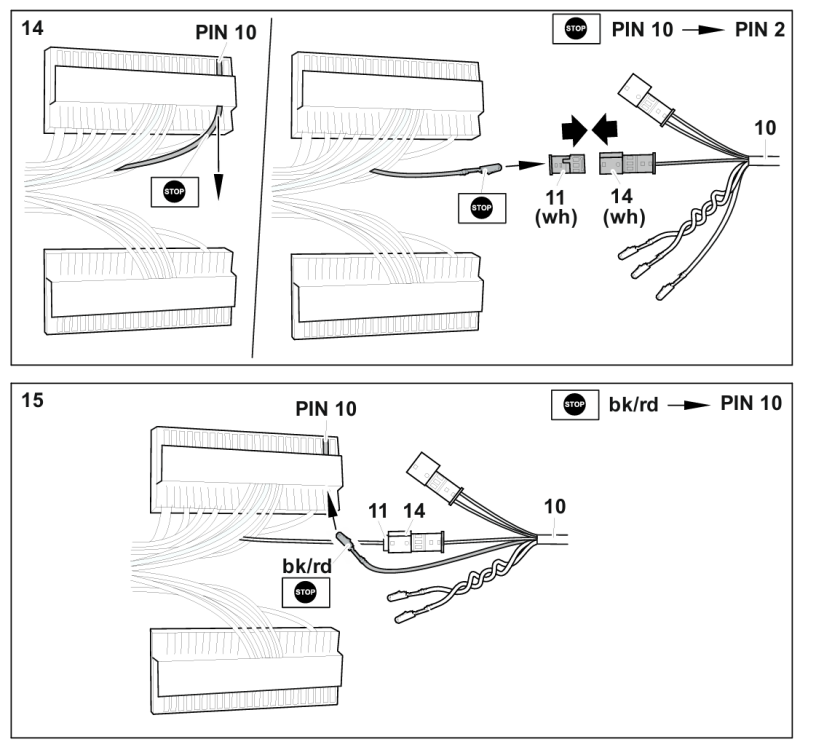
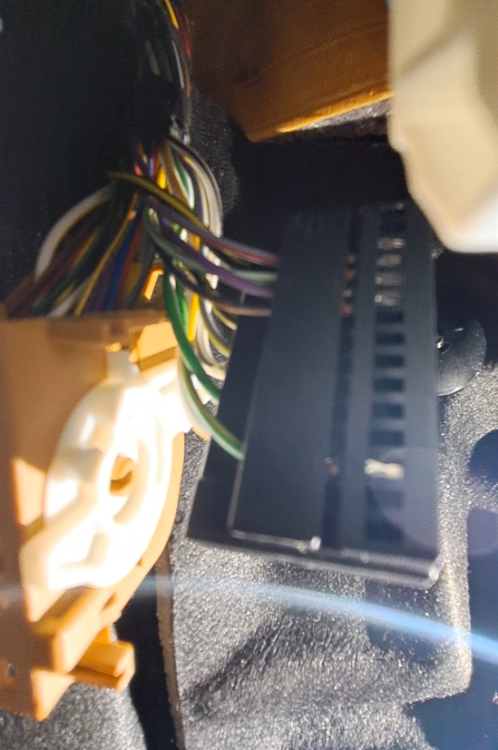
Hello, Long time reader here, but now I stumbled on a problem I cannot solve myself. The car is a Skoda Fabia 2018 Manufactured October 2017. I have installed a dedicated towbar and wiring kit from Westfalia, 317 114 300 113. Link to PDF can be found here: https://www.westfalia-automotive.com/fileadmin/pdf/e_anlagen/317/e317114391101.pdf On page 24, it says to unplug pin 10, but there is not a cable to that "port". Instead, there is a green/yellow cable connected to the port beside it, picture attached. I thought it might be an error from westfalias side, so I connected the green/yellow wire instead. (I think this is my issue. ) I proceeded to follow the instruction and finished the installation, the only other deviation is that I connected the ignition power to the wiring kit from the radar fuse instead (Step 28 in westfalias instruction) After installation, I started VCDS and activated the towbar via CAN gateway - Enable 69-Trailer. When I tried to connect to the trailer module, I got "Failed to connect" to the trailer module, VCDS could not find the trailer module. My question is, which cable should I connect to instead? Or do I have other faults? Westfalias instruction does not specify which colors the cable connected to port 10 has, so I am stumped as I do not have a wiring diagram for the car. I have tried to connect the towbar to a trailer, the taillights do light up, but turn signals, brake light and other functions do not work. I am very grateful for any suggestions and inputs, thanks in advanced. Best regards, Fredric