Shanew
Finding my way
-
Joined
-
Last visited
Everything posted by Shanew
-
Unfortunately not. While I had the wheel off to change the sensor I could not see and physical of obvious damage to the cable in the wheel arch so have ruled that part out. As the fault is intermittent to the point I can drive from Leeds to Bridlington without issue but recieve the warnings 3 times over within 15 minutes on the journey home I really don't know what to try next.
-
Partial update due to late delivery. Sensor came today and took all of 15 minutes to swap over from jacking up the car to tightening up the wheel nuts. The torx bolt came out with no issues and a little wiggle brought the sensor straight out. Hopefully this solves the issue. I'll post back in a day or two to hopefully put this post to bed.
-
@nta16 I went for a Febi Bilstein part who specify it as an alternative to the oem part number rather just make of car so hopefully i should have no compatibility issues. I already have some contact cleaner to ensure the plug is thoroughly clean before reassembly and my multimeter to check voltage is consistent with a bit of wiggling on the cable. Hopefully it'll eliminate everything except what ever the sensor reads in the hub and the module which controls it. Both of these will be beyond my capabilities
-
@nta16 Cheers, i got a couple of these are little while back. Middle isle special in either lidl or aldi. With Regards to the dealer. The most annoying part is that the dash was lit up like a Christmas tree when I took it in, I showed the mechanic a video of the dash as the fault occurred showing all the warnings being displayed one after the other. The fact that I demonstrated the issue yet no diagnostics were done other than simply plugging in a cable was more annoying even than the surprise charge. I've penned a complaint that I'll be sending in once it's fixed "hopefully" as when I collected the car having had the mechtronic done I was told they had updated a number of modules as the software was outdated and If I had any issues just to call back. Then this issue started so im thinking maybe a software issue as so many things could not possibly have broken at once. I called the dealer and they said not to worry, just pop back and they'll have a look. At no point was it implied they were going to be charging anything.
-
Cheers for the help and advice everyone. I'll post back later, hopefully in celebration of fixing a fault with the help of a community that a main dealer with access to all the knowledge at Skoda couldn't be arsed with.
-
The local skoda dealer is a waste of time and billed me £168 to tell me they couldn't find the fault and maybe I need another new battery. In some good news, ive had even logging running while driving and the error presented itself and was showing the front right wheel at 0mph while the rest were at 26mph. New sensor arrives Sunday so it get it swapped over, give the plug a squirt with contact and see how it goes.
-
@D402 The issue started a few days after the Mechtronic unit was replaced. From the video Danoid posted, it looks like I should have 12v on the sensor plug with the ignition on so I might get the multimeter out and give the wires a wiggle to see if I loose voltage. I dont have a Hex v2 cable to do any canbus diagnostics
-
@D402 Mines just an eBay special odb2 scanner for the ecu. It's been to an independent who used a Ross tech vcds and gave me a printout showing no issues and it's been to skoda who found no issues in diagnostics despite the warnings being on the dash. For £35 from Autodoc, I can replace all 4 abs sensors if this is going to fix it. It's certainly cheaper than going back to a dealer or buying my own cable to work out which one it is, if it is a abs sensor at fault.
-
Brand new, coded and showing as good in vcd. For what it's worth, skoda did a battery test and confirmed the battery is good and no electrical drain was found. Nothing shows in vagcom so they washed their hands of it even though they could see the error on the dash.
-
Just an update. Despite all these errors showing on dash, no faults are logged when using my odb2 code reader.
-
Cheers. I've got torque pro and an elm odb2 bluetooth dongle. I'll check for a code when I get home. Thanks again for taking the timecto reply.
-
Cheers for the reply Lloydster, this does fit the bill. I'll look at getting the sensor replaced to see if this helps. Ive tried the steering wheel lock to lock as suggested by Gammyleg but it's not cured the fault. Any suggestions on how to diagnose which is at fault rather then replace them all? Thanks.
-
Thanks for the reply. I'll give it a go. They confirmed in the health check that the battery was showing as calibrated and in good health. Then again, when the mechtronic unit was done they did a health check and everything was fine but on the one they have just done they are advising the rear shocks are leaking, the CV boots are perished and the bushes on the bottom arms are work so I really have no confidence in them.
-
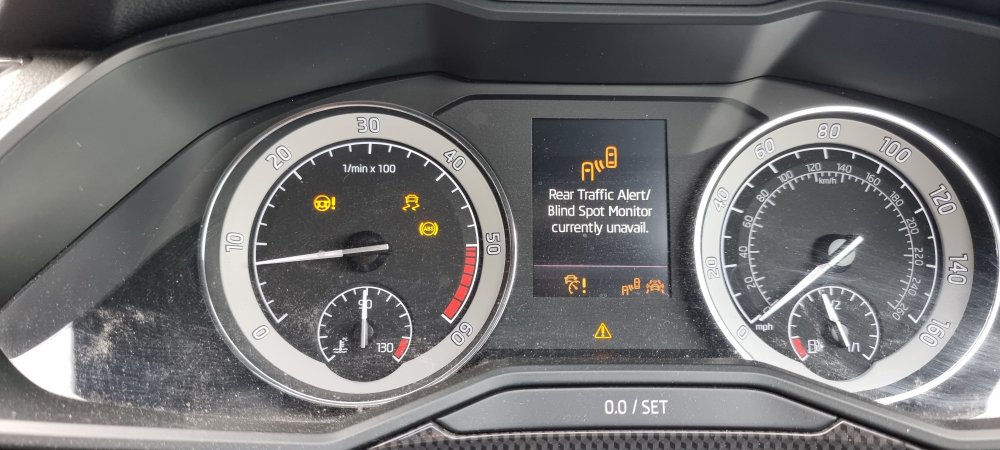
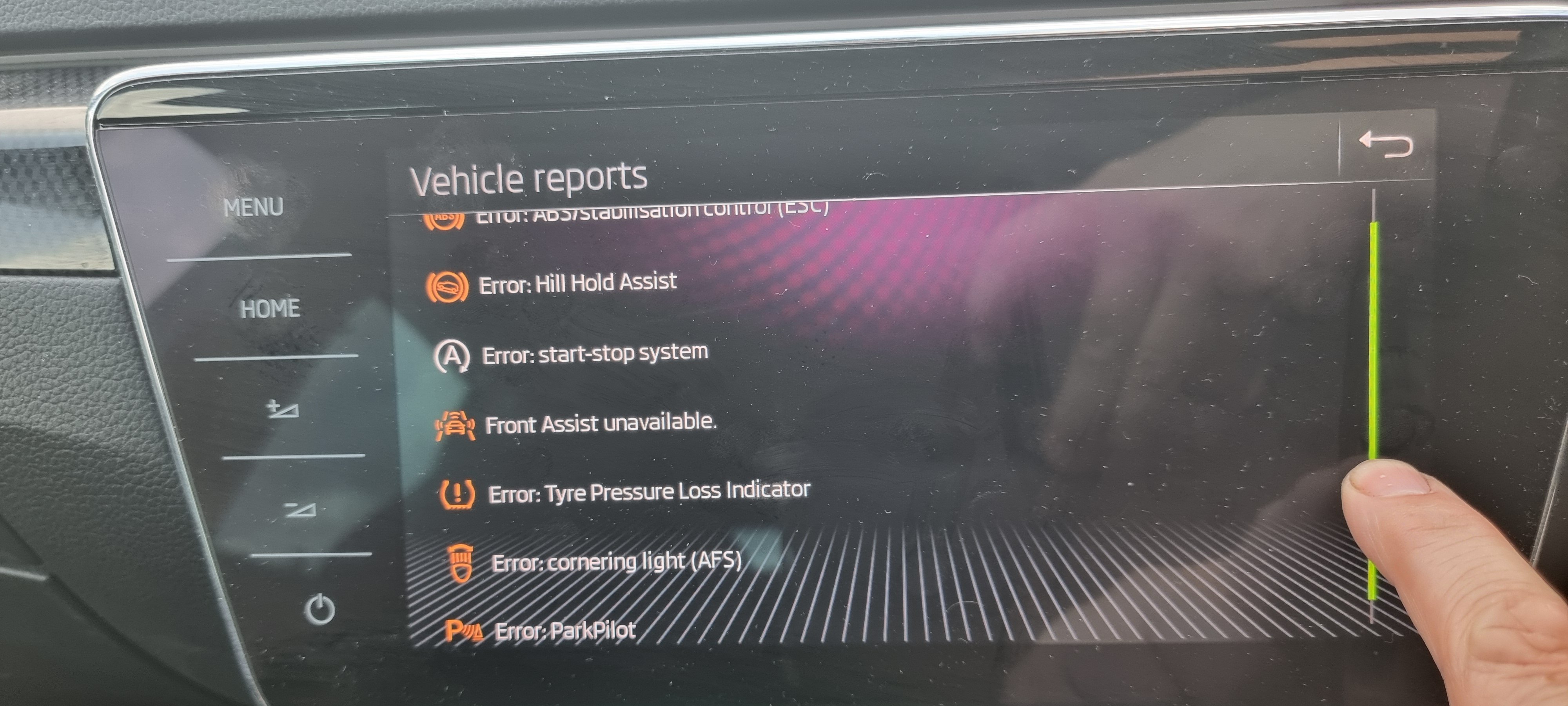
Two weeks ago I had the mechtronic unit and battery replaced on the car. They advised that a number of modules were updated at the same time to current software versions. Since getting the car back I constantly pings up with warning showing Error, stop start unavailable, Park pilot unavailable, dynamic lights unavailable, front assist unavailable, hill start unavailable to name a few. Oddly it also effects the satnav, regardless if in using Google maps through Android auto or the factor satnav your current location bounces all over the place. The car has been back to skoda twice now and they say they can find no fault despite me showing the technician the fault in person as if was having a fit when I arrived with the car. Where do I go from here or can anyone suggest what the fault could be? 2018 Skoda Superb Sportsline + Diesel with DSG Cheers in advance.