randomcastle
Finding my way
-
Joined
-
Last visited
-
Thanks. I'll have a dig about in the settings
-
Speed limit warnings are 1 of several "driver assistance" features I have to turn off every time before I drive. I live in a pretty rural location and my 2026 L&K superb seems to make speed limits up. Even where an unrestricted sign is clearly visible it will say 20 is the limit. It's more than annoying, it's dangerous, causing the car to slow suddenly or accelerate to 60 when it thinks it's out of a ghost 20 zone if you are using ACC. I feel the tech has got a bit out of control. It wouldn't be so bad if the changes "stuck", but no, every time you start up you have to change a heap of settings. Is it the same in other cars like Merc or BMW?
-
Yeah, press and hold. Didn't think of that. And not in the manual. Thanks for the suggestion
-
Does the 2026 L&K superb have a trip odometer? I mean, a mileage counter that you can zero say at the start of a holiday and then read off the total distance travelled 2 weeks later? Looked in the digital and hard copy manual and found nothing. My 2017 model had a physical button you could press that did this, but the new car ...
-
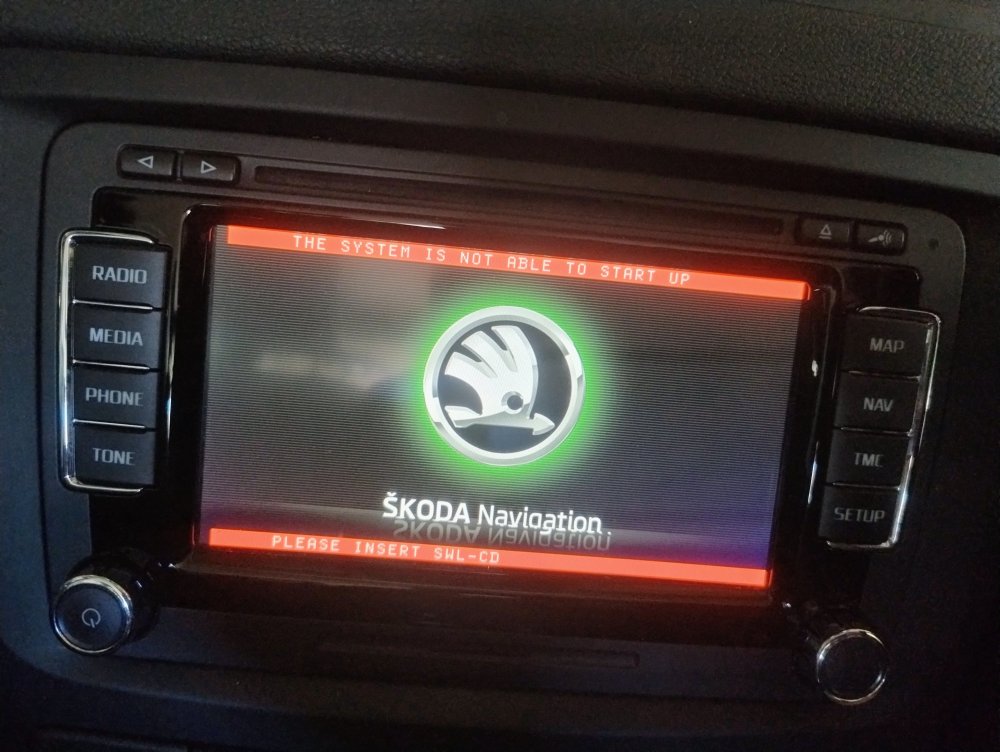
I have 2014 Yeti - Columbus infotainment system stuck in boot loop, never gets beyond Skoda Navigation splash screen. <> SETUP key combination makes it ask for SWL-CD. Does anyone have software or link that will run on this system?
-
there are a lot of old threads for other models talking about problems with the Columbus head unit. They generally end up talking about an issue that causes the unit to get into a "bootloop" - trying to start up and failing over and over (about every 25 secs) - you can hear the hard drive spin up then - nothing. In my case (Yeti L&K, 4wd, 2014 TDi 140) the screen displays the Skoda Navigation splash, but never gets beyond this - but it varies case to case. There are a number of key combinations you can try to "hard reset" the unit (equivalent to turning it off and on again for a PC). None of them worked for me, but pressing the eject and mic button (top right of the unit) and SETUP causes the following to appear over the splash screen: "The system is not able to start up" and "please insert SWL-CD." (see attached) I have not got any further yet as I can't find anyone who has this file yet. I suggest you try this key press combo and see what happens, and if you get the same message search for the SWL-CD file. I'll let you know if I get to it first