onthelongroadback
New here
-
Joined
-
Last visited
-
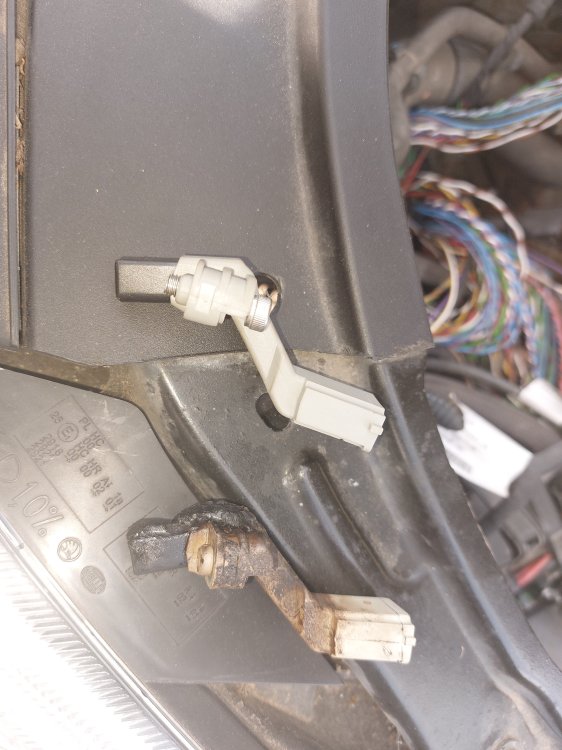
Just thought I'd give an update on this. The crankshaft position sensor was toast- literally. Fitted new sensor which was a pig of a job and all problems solved. Light grey is the new sensor and the melted one speaks for its self haha. The car had gotten stuck in a field towing a rather large trailer and the clutch/flywheel was red hot. With where sensor is located at the rear of the engine it got pretty hot also
-
Thanks for the reply, puts my mind at rest they all start like that I always thought it started quicker but old age affects the memory haha
-
Hi all, im new here and not the best with computers/ forums so please bear with me and i apologise in advance. ive got a 63 plate roomster 1.2tsi- its stuck in limp mode and wont rev at all. it flags up fault codes- P0642- sensor ref voltage a circuit low P0237- turbocharger boost sensor A circuit voltage low P0337- crank positition sensor A circuit low P2564- turbocharger boost control position sensor A low. the checks ive been able to to do show that there is the 5v supply at crank pos sensor and at turbo actuator, both grounds are fine and have a 2.5v feed when ignition is on which im assuming is switching wire? the 2.5v feed disappears when the car is running at the actuator. when the car is switched off the boost actuator rod can be moved by hand but once its running it cant be moved at all. im assuming this is a way to protect the engine when in limp mode? it takes a few seconds of cranking to start up which is longer than it used to. Im assuming that the crank sensor is on its way out? anyone had this issue before? or anyone got any other thoughts? thanks all G