PhilRey
Finding my way
-
Joined
-
Last visited
Everything posted by PhilRey
-
Hi, sorry, I never got the info on how to do this...just got used to the error popping up and disappearing again. Cheers, Phil
-
I went from 0276 and navigation continued to work with no issues. Cheers Phil
-
I've sent this via PM, thanks.
-
I'm getting an intermittent SOS warning error on the dashboard (which clears almost immediately), with the overhead SOS light also turning red (which clears itself after an engine restart). I read on another thread that updating the OCU had fixed this for somebody.
-
Yes, that is what my OBD scanner app shows me "OCU3_5WA035284B_", so I guess I just need to find the latest version for that hardware? I'm not going to lie, this is getting a bit confusing 😕
-
But which version of the firmware should I be using?
-
Hi @Cairus , thanks for your input. I'm more confused about which software I'm supposed to be using based on that table. Which one should I be using? Also, is it a simple case of extracting to a USBC stick and running the update from the service mode (like I did for my MIB3 updates) or are there other tasks to do too? Many thanks
-
Hi @GiscoYeti , yes I can open that link, but the OCU software in there looks to be the non "B" version software OCU3_5WA035284__. I need OCU3_5WA035284B_
-
Hi @Cairus , not sure if I can receive PMs yet as I'm fairly new to the forums.
-
I've not been able to locate the file required. It looks like mibsolution.one is permanently down ☹️ Does anyone know a good source for the lastest version (1.43?) for OCU3_5WA035284B_ ? Thanks
-
Hi, I recently updated my MIB3 software to 0332. Since doing this, I've been getting the dreaded SOS warning message pop up (which clears almost immediately afterwards with the general warning then clearing when stopping/starting the car). Do I need to also update my OCU software, could this be the issue? I'm currently on 0139 but I believe there is at least a 0143 version available. My OCU is listed as OCU3_5WA035284B_ Many thanks for any help. Phil
-
No, nothing else required. I personally did reset the code using a recommended OBDII scanner and free android app, but everything worked as expected before it was reset anyway - you don't get any errors/messages if you leave the code. Phil
-
A quick update...with a new USB stick formatted as FAT32 I've completed the two upgrades to 308, then 332 without a problem. Many thanks for all your help in getting this sorted Lee, really appreciate it. Phil
-
Looks like my USB stick might be screwy, as I'm now getting errors copying files across and it won't delete the existing partition. Time to get another stick.
-
I'll try fat32, and maybe create a smaller partition just in case it doesn't like the 64GB size.
-
Yep, all formatted prior to copying the files and what you see is in the root. The only difference is the size of the USB stick is 64GB, although I used the same stick with the same formatting to update the maps a few weeks ago which worked ok, so it seems that the car can read the stick ok.
-
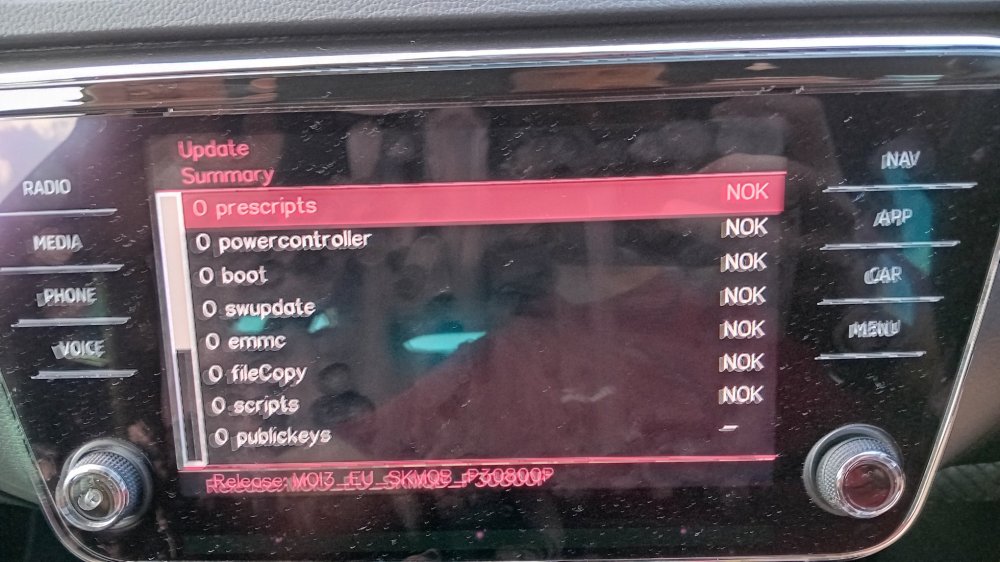
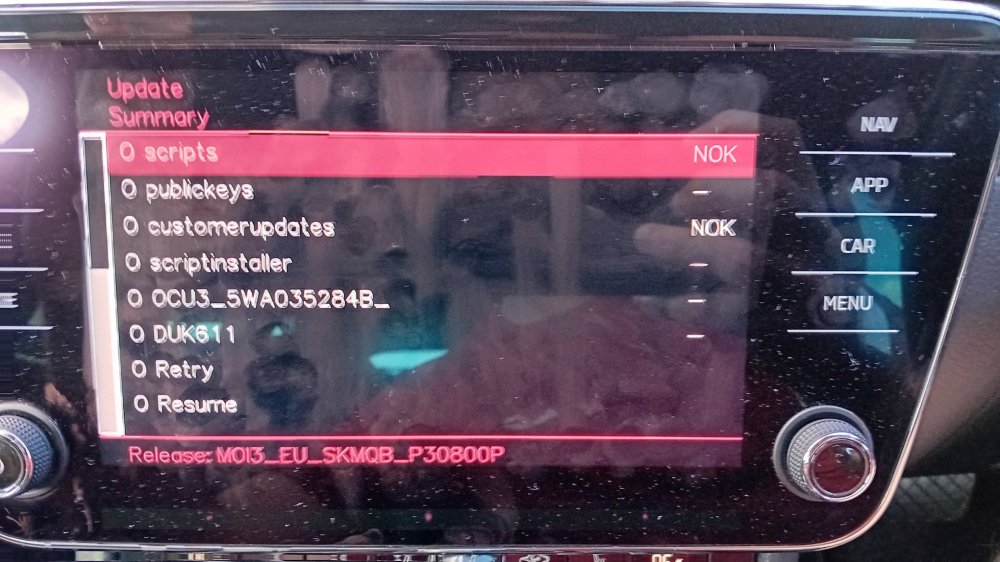
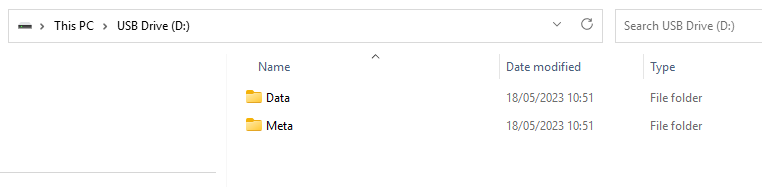
Just attempted the upgrade from 0276 to 0308...but it failed while validating the files on the USB-C stick. Below shows the results, with most sections resulting in NOK... Not sure if I've created the USB-C correctly. I formatted as exFAT and unzipped the files as shown below... Any ideas why this didn't work? Cheers Phil
-
I'm going to take the plunge and give it a go! I've ordered the charger, I'll let you know how I get on. Cheers Phil
-
If you google the fault code there are lots of explanations about setting the key to a new hex value that you can calculate. I wonder whether it's not a thing for the MIB3 units maybe? Thanks for the link to the updates, just grabbing 308 and 332 now. Cheers Phil
-
Hi Lee, I've read that once the software update completes, as it's not done with a Service Diagnostic Tool a fault code (B201A00) will occur. To sort this out you apparently have to update the "Confirmation of installation change" key value in the 5F module adapations with a new value you calculate with an XOR calculator. This will apparently clear the fault code. It was in a pdf file I found somewhere on this forum called "Firmware Update Guide v1.0.pdf". Might this not be correct? Thanks for the recommendation for the charger, I'll take a look. Cheers Phil
-
Hi, It looks like I'd need the OBDeleven with a PRO plan to be able to change the 5F module key. Is that correct? Also, many people are suggesting using a car battery charger whilst doing the updates, in case the battery discharges and bricks the unit mid update. Any recommendations on what to go for with a charger? Thanks Phil
-
Hi Lee, Thanks for the response. I've seen the method and the downloads for doing it manually, but I've not got the kit required to update the 5F module key to acknowledge the update. I guess the only other way would be for a Skoda service partner to update it, but I assume that would be chargeable as the car is out of warranty. Cheers Phil
-
Hi everyone, First time posting here, have recently bought a 2021 Skoda Superb SE L TSI S-A 1.5. Should OTA updates happen automatically as and when they are released? My Amundsen Mib3 unit is currently on software version 0276 which I know is quite old now, but I've seen posts here where some people seem to be getting OTA updates, while others have been updating software manually. Do OTA updates require a level of subscription or should they be free? Many thanks for any insight into this. Phil