SomethingRandom
Finding my way
-
Joined
-
Last visited
-
Thanks, I'll check this. Will clean up the cap and take it for a drive this evening.
-
It's not actually my car, so I think the best course of action will be to monitor the coolant level for a few weeks and report back. The seal around the bung was good, the material was fairly flexible so I feel it was ok. Might retest it again at some point just in case (maybe with higher revs).
-
I'm now hoping this is the issue? I just can't find where it is (and forgot to check the V5 for the engine code). Front carpets appear to be okay, and I don't see any crystals anywhere. It's true most journeys are short, so maybe that's part of the issue.
-
Yes, oil changes have been regular and the oil looks fine on the dipstick.
-
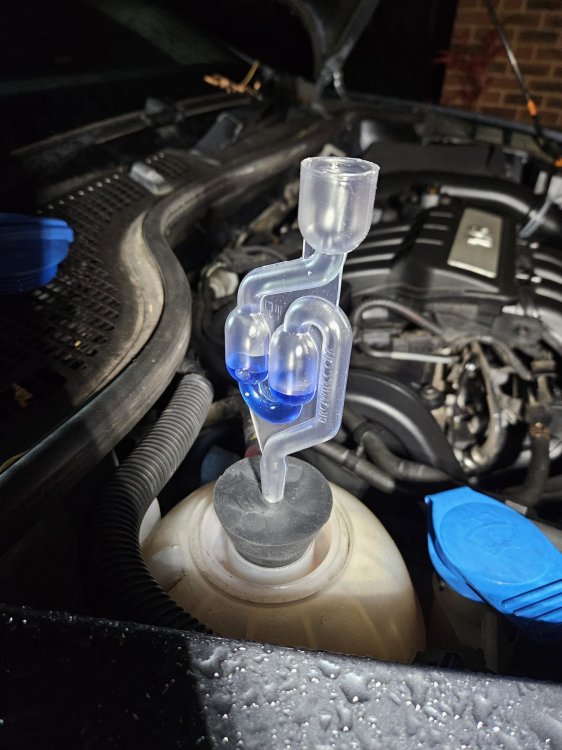
I've run a CO2 test this evening and it appears to be negative (unless I've done something wrong - the liquid was moving around but not exactly bubbling through). No noticeable colour change after 10 mins running with a warm engine.
-
The header tank doesn't look great, but there are no signs of it leaking. I'll take another look this evening just in case, would be great if that was the issue!
-
Thanks for the tip, don't know why I didn't think to check the V5! I've ordered a test kit and will check the coolant before doing anything else.
-
Hi all, I've got a 2011 Skoda Octavia 1.6 MPI (Petrol) and the coolant level keeps dropping. The oil cap is milky and I'm worried the head gasket might be gone. See engine photo here I assume it's a 1.6 BSE engine, but can't find a good diagram of the coolant system to work off. Reading around online, I understand there could be an issue with the oil cooler, but I'm not sure where this is located and what the part number is to order a replacement. Can anyone help point me in the right direction? Many thanks