




vblanche
Finding my way
-
Joined
-
Last visited
Everything posted by vblanche
-
Anyone would know how to source an used mechatronic? thanks
-
Hi all — car's currently with a Skoda independent specialist here in Bristol, and I wanted to sanity-check with the forum while they dig in. Car: Octavia RS 2.0 TSI Combi (245 PS), MY2022, 7-speed wet DSG (DQ381 / 0GC), 65000 miles. Service history: full Skoda / independent — DSG oil + filter service not done. What's happened: got the alert “ gearbox in emergency mode. No reverse possible”. Breakdown technician’s scan showed two codes: P27F500 (selector lever lock, Park position) and P176F00 (Clutch 2 closes unintentionally). P176F00 has a VAG TSB: if it's sporadic with a frequency counter of 2 or less, you clear and test drive; if it returns or is static, it's guided fault finding. Cleared the codes, drove ~5 min, and P176F00 came straight back with the counter now above 2. So it's persistent, not a one-off. Questions: Anyone had P176F00 on a DQ381 — root cause and fix? Clutch pressure sensor set, mechatronic, or clutch? Did a DSG oil + filter service ever clear it once the code was logged, or wishful thinking? Anyone managed to get Skoda to cover a DQ381 mechatronic as a goodwill job at ~4 years old? Thanks.
-
Hello, Usually, I clean the plastic interior with warm-ish water and a sponge, then microfiber...however, the marks we do on the plastics (around seats, etc) with our shoes are often still there, less visible but there. What do you guys use as a general plastic cleaning product? Thanks for your help.
-
Sorry, "when you move your hand..."? I don't understand.
-
I can't find this...maybe it does not exist anymore for the octavia 4
-
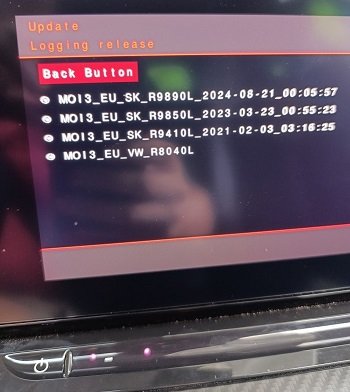
Hi, Can I ask 2 questions: - Is 1989 the latest update? - what does this pic from the engineering mode tell you? Thanks
-
taken from the net: The Octavia 4 suffered heavily in its first years of commercialization (2020-2022) of major electronic bugs related to its multimedia system (black screens, untimely restarts, driving aids that are disaggregating on their own). While major software updates have solved most of the worries, the 3.5 retains a better reputation for overall reliability. sadly, it is my case, electronic bugs (system restarts, GPS nav constantly wrong...). 😊 I wish I could go back to an oldtimer or alike...
-
except this silly and stupid soundaktor...and all these assistances that are not great at all re-1st post.
-
I'm new to skoda octavia, need to read a bit more. but mine is MIB3
-
Thanks, what do you mean by "split-screen setting"?
-
Visiting Bristol area soon, can someone recommend me a skoda specialist in the area (to troubleshoot my GPS issue)? many thanks.
-
anyone would know how I can check the antenna? thanks
-
but the antenna is...
-
Hello, I have this nasty issue of the GPS wrongly locating me...therefore I don't use it but googlemaps via android auto. Still, it's frustrating that skoda does not do anything about it, isn't it? Anyway, one possible issue seems to be with the antenna on the roof. Has anyone tried anything there? how can I access it/dismantle it? Many thanks in advance.
-
Thanks. What is tested? can it be done at home? thanks
-
Hello, My GPS keeps locating me wrongly, is it a bug of my GPS or a common bug? what can I do? thanks
-
found and solved the problem. if interested, have a look there: https://youtube.com/shorts/CquVnU0G8og?feature=share, I was shocked...but I fixed it easily.
-
Thanks everyone for your help so far. When driving with both front windows opened, it seems the noise is coming from the front right or side right.
-
indeed, 2022 petrol automatic. thanks
-
well, bought it 2 months ago. no recent service
-
Hello, I'm getting some sort of "metallic" rattling noise coming from the front of the car when I drive over bumps or alike. Has anyone got similar experience? thanks
-
Do you know how to put the car on jack stands? I need to lift up the car with the jack but then on which point should the jack stand be on? is there a central "point" under the car that can be used to lift up the rear or front on the car? thanks
-
what about disconnecting the device?
-
Thanks. I guess VCDS is not cheap?
-
Hello, Apart for OBDEleven, is there a way to permanently get rif of this soundaktor thing? Thanks


