Skip to content

TL@

Members
  • Joined

  • Last visited

  1. It's not hard, just give it a good pull.
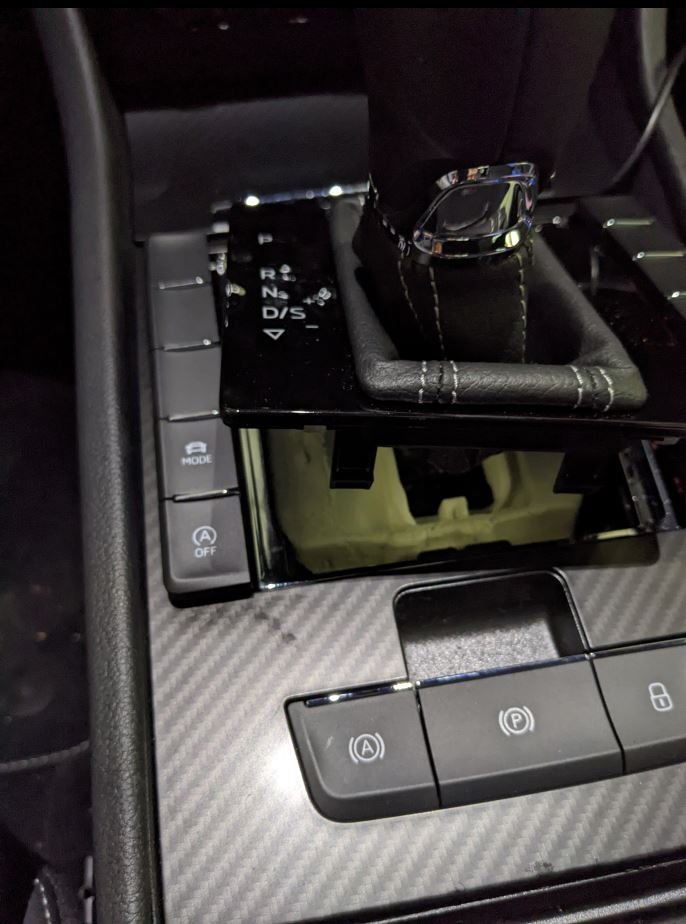
  2. You don't have to pick the button, just remove the entire panel like shown on my pictures.
  3. But your start/stop button is on the wrong side (like the steering wheel 🤣), the buttons on that side of my car have longer cables too.
  4. Thanks a lot for the help, I got it done yesterday. Seems to be working great. It did hurt my fingers, a lot of force was required, I was a bat scared to damage something but in the end I managed without breaking or scratching anything.
  5. You pulled it up from the inside then (fingers in the hole of the gearshifter)?
  6. How do I get that part loose? I've been trying with a prying tool (plastic) but I can't get the trim loose.
  7. I got the rubber gator of, but still no room to put my hand. I'm just about to give up 😪
  8. I'll try that next week. Just need to figure out how to get the gaiter off (on a manual you can twist the gearknob of but that doesn't work a DSG)
  9. It seemed to work but after the car was stationary for a couple of hours, it stopped working. I used the 'app' in OBD11. Guess it didn't stick. And yes, 2022 model.
  10. I got the buttons out but the cable was way to short to get disconnected and reconnected. I eventually solved it by just using OBD11 and coding the start/stop out. Seemed to have worked.
  11. TL@ changed their profile photo
  12. I've got one of these for my new Superb Sportline. I would like to install it but can't seem to figure out how to get the buttons out to install this.

Important Information

Welcome to BRISKODA. Please note the following important links Terms of Use. We have a comprehensive Privacy Policy. We have placed cookies on your device to help make this website better. You can adjust your cookie settings, otherwise we'll assume you're okay to continue.

Account

Navigation

Configure browser push notifications

Chrome (Android)
  1. Tap the lock icon next to the address bar.
  2. Tap Permissions → Notifications.
  3. Adjust your preference.
Chrome (Desktop)
  1. Click the padlock icon in the address bar.
  2. Select Site settings.
  3. Find Notifications and adjust your preference.